




 Garantía de entrega







SKU/Artículo: AMZ-B07DP7SPNH
LoveRPi
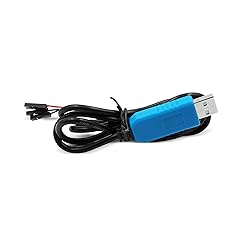
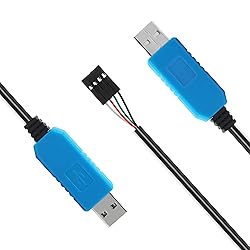
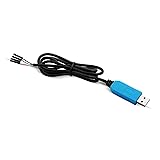
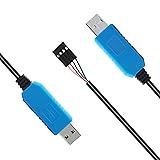
LoveRPi USB UART Serial Debug Cable for Raspberry Pi and 3.3V Systems
Size:
3.3V (Raspberry Pi)
Detalles del producto
Disponibilidad:
En stock
En stock
Peso con empaque:
0.30 kg
0.30 kg
Devolución:
Sí
Sí
Condición
Nuevo
Nuevo
Producto de:
Amazon
Amazon
Viaja desde
USA
USA
Sobre este producto
- LoveRPi USB UART Serial Debug Cable for Raspberry Pi, Libre Computer, and other 3.3V Systems RED -> 5V POWER (Optional) GREEN -> 3.3V TX to RX OF DEVICE WHITE -> 3.3V RX to TX OF DEVICE BLACK -> 0V GND
S/ 53.04
31% OFF
S/ 36.58
IMPORT EASILY
By purchasing this product you can deduct VAT with your RUT number
S/ 53.04
31% OFF
S/ 36.58
 Llega en 10 a 15 días hábiles
con envío
 Tienes garantía de entrega
Conoce más detalles
DEBUG SERIAL UART CABLE FOR RASPBERRY PI AND OTHER 3.3V SYSTEMS: Instead of guessing problems through a black screen, find out exactly what is going on with your board. Issue commands, grab logs, and debug problems quickly with his convenient USB cable. PLUG AND PLAY WITH WINDOWS MAC LINUX: Fire up putty for Windows, Minicom or Screen or Mac and Linux to get direct access when you don't have video or network. RASPBERRY PI 3/4 GUIDE: You must open /boot/config.txt or edit config.txt on your MicroSD card and add "enable_uart=1" without quotes in order for this to work for Raspberry Pi 3/4 Model B and Model B+. Otherwise UART is not enabled and will not display anything. CONNECTING TO 40 PIN HEADER: Three pins need to be connected for UART to work, the black ground (GND) wire, the white RX wire, and the green TX wire. Black should be connected to pin 6, white should be connected to pin 8, and green should be connected to pin 10. CONFIGURE BAUD RATE, FLOW CONTROL, PARITY FOR YOUR BOARD: The default baud rate for Raspberry Pi is 115200. Flow control is not supported by the Raspberry Pi 3 so it should be disabled. 8N1 mode must be selected so that there are 8 data bits, no parity, and 1 stop bit.
Compra protegida
Disfruta de una experiencia de compra segura y confiable
![]() Garantía de entrega
Garantía de entrega
Con Tiendamia todas tus compras cuentan con Garantía de Entrega o devolución total de tu dinero.
Compras 100% seguras y garantizadas, para que pidas lo que sueñas y lo recibas del mundo a tu puerta.
Saber más.
Visa

Mastercard

American Express

