








 Garantía de entrega


SKU/Artículo: AMZ-B01M9EURM1
XP-Pen
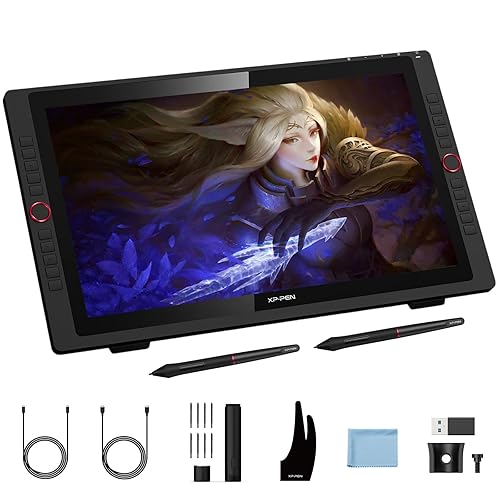
XP-PEN Artist22E Pro Drawing Pen Display Graphic Monitor IPS Monitor 8192 Level Pen Pressure Drawing Pen Tablet Dual Monitor with 16 Express Keys and Adjustable Stand 21.5 Inch
Size:
Style:
Detalles del producto
Disponibilidad:
Fuera de stock
Fuera de stock
Peso con empaque:
6.95 kg
6.95 kg
Devolución:
No
No
Condición
Nuevo
Nuevo
Producto de:
Amazon
Amazon
Viaja desde
USA
USA
Sobre este producto
- 1. Important Reminder XP-PEN Artist22EPro drawing tablet must be connected to a computer to work, it's compatible with Windows 10/8/7(32/64bit), MAC OS 10.10 or above OS. 2. Connection Tips Your laptop/desktop needs to have a HDMI or VGA or DVI and USB-A ports available for the connection. If your computer does not have HDMI or VGA or DVI and USB-A ports, then you need an extra converter for the connection, such as USB-C to USB-A adapter, etc. (Depends on what ports that your laptop/desktop has). 3. Install the XP-PEN Driver on Your Computer 1-Before Driver Installation: Please Remove Other Brand’s Driver from your computer and reboot before installing the XP-PEN’s driver, or there will driver conflict problems. 2-Driver Download: Our driver will be regularly updated, so please go to our official web to download the newest driver, and install it on your computer. 3-For Windows Users:Please close all drawing programs and run the XP-PEN driver as Administrator when installing. (IMPORTANT) 4. For Mac Mojave (10.14), Catalina (10.15) and above OS Users: Mac Mojave (10.14) or above OS has upgraded in the security section, you need to put programs you newly downloaded into the accessibility list first to normally use it. Details steps please see the FAQ section on the XP-PEN web. 5. After-sale Service from XP-PEN Please checks the Quick Guide, or search XP-PEN online to find a way to us for further assistance whenever you encounter problems with the use of the Artist22E Pro drawing tablet, we are always standing by to help! XP-PEN provides a one-year warranty and lifetime tech support. 6. Drawing Programs Please install a drawing program to your computer before your art creation. Drawing programs like krita , medibang, etc. Or register your xppen Artist22E Pro drawing tablet on xppen web to apply for an ArtRage 5, openCanvas and Cartoon Animator 4 Pipeline drawing program.

Fuera de stock
Selecciona otra opción o busca otro producto.
Conoce más detalles
Functions such as drawing, sketching, painting, design, and editing can now be performed directly on the surface of your monitor. Expand your creativity and work naturally and intuitively. Artist22E Pro drawing monitor meets the needs of all types of digital artists at any skill level Features 16 customizable Express keys. Compared with Artist 22E, 16 express keys have 16 different functions for convenience and efficiency. It is designed for both left and right handed users. The driver allows the express keys to be attuned to many different software Our 21.5 inch drawing pen display features 1080p resolution with 72% Color Gamut and an extra-wide 178° viewing angle. The Max Report Rate of the Artist 22E Pro has increased to 266 RPS with 8192 pressure levels provides unprecedented accuracy and precision in your work, to make lines flow smoother and perform better, working faster and efficiently The Artist 22E Pro driver can support 4k displays. The custom-designed anti-reflective coating reduces glare by 56 percent. Latest Multi-function Pen Holder. It can keep your pen, pen nibs. You can use it as a pen stand and pen holder. It’s convenient for you to take everywhere Artist22E Pro Graphic drawing monitor supports Windows 7/8/10 and Mac Os x 10.8.x or later. Compatible with popular digital art software such as Adobe Photoshop, Corel Painter, Comic Studio, SAI, Zbrush, Medibang Paint, Toonboom Harmony etc
Compra protegida
Disfruta de una experiencia de compra segura y confiable
![]() Garantía de entrega
Garantía de entrega
Con Tiendamia todas tus compras cuentan con Garantía de Entrega o devolución total de tu dinero.
Compras 100% seguras y garantizadas, para que pidas lo que sueñas y lo recibas del mundo a tu puerta.
Saber más.
Visa

Mastercard

American Express

 Tienes garantía de entrega