


 Garantía de entrega




SKU/Artículo: AMZ-B08X46P868
XP-Pen
Drawing Tablet with Screen XPPen Artist 22 2nd Computer Graphics Tablet 122% sRGB with 8192 Levels Tilt Function Battery-Free Stylus, 21.5inch Pen Display Compatible with Windows, Mac, Linux
Size:
21.5 Inch
Style:
Standard W/O Keys
Detalles del producto
Disponibilidad:
En stock
En stock
Peso con empaque:
1.27 kg
1.27 kg
Devolución:
Sí
Sí
Condición
Nuevo
Nuevo
Producto de:
Amazon
Amazon
Viaja desde
USA
USA
Sobre este producto
- 1. Important Reminder XP-PEN Artist22 2nd drawing tablet must be connected to a Laptop/desktop to work, it's compatible with Windows 10/8/7(32/64bit), MAC OS 10.10 or above OS. 2. Connection Tips Your laptop/desktop needs to have Type-C or HDMI port available for the connection. If your computer does not have Type-C or HDMI ports, then you need an extra converter for the connection, such as VGA/DVI/DP to HDMI adapter, etc. (Depends on what ports that your laptop/desktop has). 3. Install the XP-PEN Driver on Your Computer 1-Before Driver Installation: Please Remove Other Brand’s Driver from your computer and reboot before installing the XP-PEN’s driver, or there will driver conflict problems. 2-Driver Download: Our driver will be regularly updated, so please go to our official web to download the newest driver, and install it on your computer. 3-For Windows Users:Please close all drawing programs and run the XP-PEN driver as Administrator when installing. (IMPORTANT) 4. For Mac Mojave (10.14), Catalina (10.15) and above OS Users: Mac Mojave (10.14) or above OS has upgraded in the security section, you need to put programs you newly downloaded into the accessibility list first to normally use it. Details steps please see the FAQ section on the XP-PEN web. 5. After-sale Service from XP-PEN Please checks the Quick Guide, or search XP-PEN online to find a way to us for further assistance whenever you encounter problems with the use of the Artist22 2nd drawing tablet, we are always standing by to help! XP-PEN provides a one-year warranty and lifetime tech support. 6. Drawing Programs Please install a drawing program to your computer before your art creation. Drawing programs like krita, medibang, etc. Or register your xppen Artist22 2nd drawing tablet on xppen web to apply for an ArtRage 5, openCanvas and Cartoon Animator 4 Pipeline.
S/ 2,363.58
44% OFF
S/ 1,313.09
IMPORT EASILY
By purchasing this product you can deduct VAT with your RUT number
S/ 2,363.58
44% OFF
S/ 1,313.09
 Llega en 5 a 10 días hábiles
con envío
 Tienes garantía de entrega
Conoce más detalles
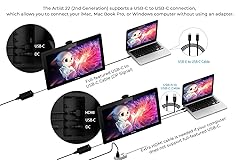
USB-C to USB-C connection: XPPen 22 2nd drawing tablet supports USB-C to USB-C connection(sold separately), which allows you to connect your iMac, Mac Book Pro, or Windows computer without using an adapter Adjustable stand: With the adjustable stand, you can change the screen’s angle from 16 to 90 degrees to suit your needs and create comfortably. Also, the specially designed cable slot and detachable back cover keep your cables protected and organized More precise: With better accuracy, XPPen Artist 22 2nd pen tablet lets you draw with more precise cursor positioning, even at the four corners. This ensures a satisfying drawing experience Richer Color Gamut: With a screen color gamut of 86% NTSC (Adobe RGB≥90%,sRGB≥122%), the 22 2nd Display delivers a diverse and vibrant spectrum of colors, allowing you to create vivid artwork enriched by lifelike hues and sharp details Premium Pen Technology: The Batteryless stylus supports up to 60 degrees of tilt function and 8,192 pressure sensitivity levels, helping you to effortlessly create exquisite strokes and seamless shading Wide Compatibility: The 22 2nd drawing monitor supports Windows 10/8/7 and Mac OS X 10.10 (and higher). It is also compatible with popular digital art software, such as Adobe Photoshop, Illustrator, SAI, CDR, GIMP, Krita, MediBang, FireAlpaca, and Blender3D What You Get: 1 x 21.5” Graphics Display, 1 x PA6 Battery-free Stylus, 1 x USB-C to USB-C Cable, 1 x USB-A to USB-C Cable, 1 x HDMI Cable, 1 x Power Adapter, 1 x Power Cord, 1 x Pen Holder (comes with 8 pen nibs), 1 x Quick Guide, 1 x Cleaning Cloth, 1 x Black Drawing Glove Online Teaching and Working: XPPen Artist 22 2nd drawing monitor computer graphics tablet is designed for digital drawing, painting, sketching, E-signatures, online teaching, remote work, photo editing, it's compatible with Microsoft Office apps like Word, PowerPoint, OneNote, Zoom, Xsplit etc. Works perfect than a mouse, visually present your handwritten notes, signatures precisely
Compra protegida
Disfruta de una experiencia de compra segura y confiable
![]() Garantía de entrega
Garantía de entrega
Con Tiendamia todas tus compras cuentan con Garantía de Entrega o devolución total de tu dinero.
Compras 100% seguras y garantizadas, para que pidas lo que sueñas y lo recibas del mundo a tu puerta.
Saber más.
Visa

Mastercard

American Express

