






 Garantía de entrega






SKU/Artículo: AMZ-B0GDXYJ1RZ
IS
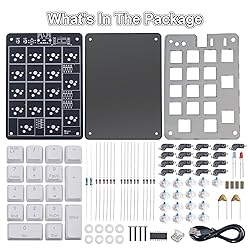
Icstation Numeric Keypad Soldering Practice Kit, 17 Key USB Hot-Swappable Blue Switches Mechanical Number Pad with PBT Keycaps STEM Soldering Project for School Learning Hobbyists Laptop PC Computer
Detalles del producto
Disponibilidad:
En stock
En stock
Peso con empaque:
0.30 kg
0.30 kg
Devolución:
Sí
Sí
Condición
Nuevo
Nuevo
Producto de:
Amazon
Amazon
Viaja desde
USA
USA
Sobre este producto
- Features: 1.Supports numbers and symbols input. 2.Can switch between numeric input mode and arrow key mode. 3.Hot-Swappable blue switches 4.USB-A interface connection, plug and play. Parameters: 1.Workting Voltage: DC 5V 2.Workting Current: <100mA 3.Power Supply: Type-A USB 2.0 interface for power supply 4.Workting Temperature: -20°C ~ 85°C 5.Workting Humidity: 5% ~ 85% RH 6.Dimensions: 121*86*28mm Usage Instructions: Connect the product to the computer using the data cable included in the package to use it normally. The ""Num"" key switches between the numeric keypad and the arrow keys. LED1 (blue) indicates the numeric keypad is enabled, while LED2 (red) indicates the arrow keys are enabled.
S/ 170.81
55% OFF
S/ 77.63
IMPORT EASILY
By purchasing this product you can deduct VAT with your RUT number
S/ 170.81
55% OFF
S/ 77.63
 Llega en 5 a 10 días hábiles
con envío
 Tienes garantía de entrega
Conoce más detalles
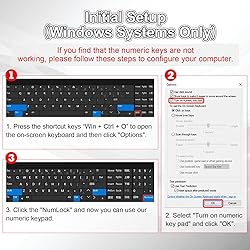
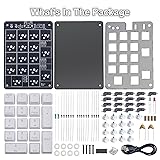
✔ 【Windows-Only Compatibility】This numeric keypad works exclusively with Windows PCs and is not compatible with macOS, ChromeOS, or Linux. Before first use, please follow the steps to configure your computer: Press the shortcut keys “Win + Ctrl + O” to open the on-screen keyboard → Click Options → Select "Turn on numeric key pad" and click "OK" → Click the "NumLock". Once configured, you can use our numeric keypad. Note: Laptops without a built-in numpad require this step. ✔ 【Hot-Swappable Blue Switches】Pre-installed with blue mechanical switches that deliver a crisp, clicky typing feel and immediate tactile feedback. All keys support hot-swapping—simply replace them with standard 3-pin or 5-pin mechanical switches without soldering to easily experiment with different keystroke feels and create your own customized typing experience. ✔ 【Switch between two modes】Equipped with the standard Num Lk function key, it can switch between numeric input mode and arrow key mode. It is suitable for scenarios that require frequent input of numbers or navigation operations, such as spreadsheet editing, programming and data processing, to enhance operational efficiency and reduce hand movement. ✔ 【Includes a Dual USB-A Cable】The kit includes a cable with USB-A male connectors on both ends—one connects to the keypad’s PCB, and the other plugs into your computer. This design ensures more stable power delivery and signal transmission, especially suitable for older computers or devices that are sensitive to USB recognition. After assembly, it works plug-and-play ✔ 【Beginner-Friendly Soldering Kit for DIY Electronics】This product is a complete 17-key numeric keypad soldering kit. The PCB features clear silkscreen markings that make component placement and polarity easy to identify. It includes fully illustrated step-by-step instructions with detailed diagrams, guiding you through every stage of assembly. Whether you're an electronics hobbyist, or a first-time solderer, this hands-on project offers a fun and practical way to learn basic circuit principles while building your own functional numeric keypad.
Compra protegida
Disfruta de una experiencia de compra segura y confiable
![]() Garantía de entrega
Garantía de entrega
Con Tiendamia todas tus compras cuentan con Garantía de Entrega o devolución total de tu dinero.
Compras 100% seguras y garantizadas, para que pidas lo que sueñas y lo recibas del mundo a tu puerta.
Saber más.
Visa

Mastercard

American Express

