






 Garantía de entrega





SKU/Artículo: AMZ-B09PKJMK6L
BTXETUEL
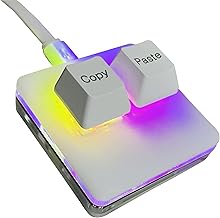
BTXETUEL Copy and Paste 2-Key Keyboard SAYO OSU Keypad Hotswap One Handed Mechanical Gaming Keyboard Cherry Switch RGB Backlit Mini USB Keypad for macros or Rhythm Games
Color:
Black
Detalles del producto
Disponibilidad:
En stock
En stock
Peso con empaque:
0.30 kg
0.30 kg
Devolución:
Sí
Sí
Condición
Nuevo
Nuevo
Producto de:
Amazon
Amazon
Viaja desde
USA
USA
Sobre este producto
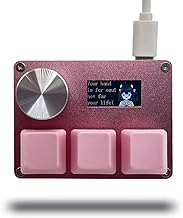
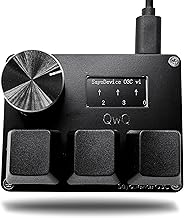
- [Keypad] Hot-swappable HID Standard Keypad with Cherry Red Switches. [Function] The default function is Copy and Paste. You can also use other functions, such as Shortcut keys, Multi-step operation, Multi-key in one, Cut, Undo, Redo, Select all, Play, Pause, Volume, Switch song, Forward, Backward, Custom script, etc. You can control the light color and gradient mode of the case you want through the software. [Programming] Programming is fairly straightforward, and the programming app has an understandable English translation. In addition to standard macros, it can do many other things, including simulating a mouse. [Device] It will save your instructions on the device. After programming it, you don’t need to set it up again when you change the computer. (If you want to use it on MAC or LINUX system, you need to pre-set it on WINDOWS system). [Help] If you encounter any problems with the keypad, please contact us, we will help you deal with it as soon as possible. [Package Listing] 1*mini 2-key black keyboard 1*shaft-puller 1*5 feet long USB data cable 2*copy&paste keycaps(black and white) 1*Instructions
S/ 112.51
60% OFF
S/ 45.00
IMPORT EASILY
By purchasing this product you can deduct VAT with your RUT number
S/ 112.51
60% OFF
S/ 45.00
 Llega en 5 a 10 días hábiles
con envío
 Tienes garantía de entrega
Conoce más detalles
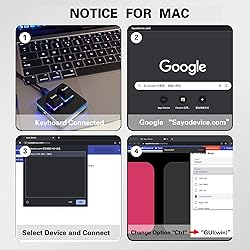
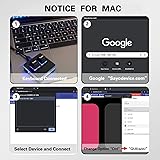
【Package Listing】 1*mini 2-key black keyboard 1*shaft-puller 1*5 feet long USB data cable 2*copy&paste keycaps(black and white) 【Copy Keyboard】For Windows User,this is Plug and Play, Out of the Box, no Software and Website Required for Copying and Pasting. 【Mac User Notice】 Before using, you need to connect the keyboard to the MAC computer, open the webpage link "SayoDevice. com", and manually configure the settings for the two buttons: Left Button=GUI(win)+C, Right Button=GUI(win)+V. 【Functions】 The default function is "Copy" and "Paste". You can also use other functions, such as Shortcut keys, Multi-step operation, Multi-key in one, Cut, Undo, Redo, Select all, Play, Pause, Volume, Switch song, Forward, Backward, Custom script, etc. You can control the light color and gradient mode of the case you want through the software or website.
Compra protegida
Disfruta de una experiencia de compra segura y confiable
![]() Garantía de entrega
Garantía de entrega
Con Tiendamia todas tus compras cuentan con Garantía de Entrega o devolución total de tu dinero.
Compras 100% seguras y garantizadas, para que pidas lo que sueñas y lo recibas del mundo a tu puerta.
Saber más.
Visa

Mastercard

American Express

