


 Garantía de entrega




SKU/Artículo: AMZ-B0FYMWG3YS
KH866
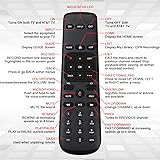
Remote Control Replacement for DIRECTV Gemini Box/Set-top Box Device 4K – Remote Controller Model, Compatible with DIRECTV Set-top Box (RC82V)
Detalles del producto
Disponibilidad:
En stock
En stock
Peso con empaque:
0.30 kg
0.30 kg
Devolución:
Sí
Sí
Condición
Nuevo
Nuevo
Producto de:
Amazon
Amazon
Viaja desde
USA
USA
Sobre este producto
- Replacement Remote Control Controller for DIRECTV Gemini Box Device 4K Remote Pairing Instructions To connect the DIRECTV remote control with the set-top box (STB), follow these steps: 1. Press and hold Rewind and Fast Forward together for 3 seconds until the LED indicator begins flashing. 2. Enter 961, then press the CH Up button. 3. Using the numeric keypad, input the last six digits of the RID located on the back of the STB. 4. Press and release the ENTER key; successful pairing is confirmed when the green LED flashes twice. Unpairing the Remote To remove the pairing, press and hold Dash and Enter simultaneously for 3 seconds until the LEDs flash. The RCU will disconnect from the STB. Compatibility: Works with DIRECTV Set-top Box, Models RC82V Power Requirement: 2 × 1.5V AA alkaline batteries (not included) Package Includes: 1 × Remote Control
S/ 195.27
49% OFF
S/ 100.14
IMPORT EASILY
By purchasing this product you can deduct VAT with your RUT number
S/ 195.27
49% OFF
S/ 100.14
 Llega en 10 a 15 días hábiles
con envío
 Tienes garantía de entrega
Conoce más detalles
Compatible Streaming Device – Designed to work with DIRECTV Set-top Box Model, ensuring stable control and reliable performance Powered Remote – Operates on 2 × 1.5V AA alkaline batteries for consistent power. Note: Batteries and user manual are not included Simple Pairing Process – To pair the DIRECTV remote control with the set-top box (STB), press and hold Rewind + Fast Forward for 3 seconds until the LED flashes, enter 961, then press CH Up Complete Pairing Setup – Use the number keys to input the last six digits of the RID located on the back of the STB, then press ENTER; pairing is confirmed when the green light flashes twice Easy Unpairing Function – To clear pairing, press and hold Dash + Enter for 3 seconds until the LEDs flash, allowing the RCU to disconnect from the STB. Remote Model: RC82V
Compra protegida
Disfruta de una experiencia de compra segura y confiable
![]() Garantía de entrega
Garantía de entrega
Con Tiendamia todas tus compras cuentan con Garantía de Entrega o devolución total de tu dinero.
Compras 100% seguras y garantizadas, para que pidas lo que sueñas y lo recibas del mundo a tu puerta.
Saber más.
Visa

Mastercard

American Express

