





 Garantía de entrega








SKU/Artículo: AMZ-B0FCSRGBCX
ciciglow
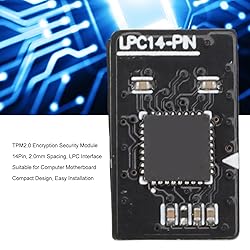
ciciglow TPM2.0 Encryption Security Module, 14 Pin TPM Remote Card Protective Module Compatible with for Motherboard, Easy Installation and Compact Design
Detalles del producto
Disponibilidad:
En stock
En stock
Peso con empaque:
0.30 kg
0.30 kg
Devolución:
No
No
Condición
Nuevo
Nuevo
Producto de:
Amazon
Amazon
Viaja desde
USA
USA
Sobre este producto
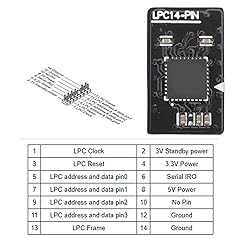
- Spec: Item Type: TPM2.0 Security Module Product Material: PCB Pin Definition: 14Pin Interface: LPC TPM Version: TPM 2.0 Compatible Device: PC RAM Memory Technology: DDR4, DDR3 Specifications: TPM 2.0 Module, 2.0mm Spacing, 2 x 7P, 14-1 pin Security Module Chip Help you avoid some strange problems encountered when using fTPM, such as: 1. The encryption key data is erased during the BIOS update. 2. After the CPU is upgraded or replaced, the certificate information is lost or becomes invalid (this may occur even if you replace an old CPU with a CPU of the same model). 3. Random CPU lag or performance issues, especially for 11 CPU. How to Use: Take out the product and use it directly. Package List: 1 x TPM2.0 Module Note: Actual performance may vary depending on your system configuration.
S/ 197.53
60% OFF
S/ 79.01
IMPORT EASILY
By purchasing this product you can deduct VAT with your RUT number
S/ 197.53
60% OFF
S/ 79.01
 Llega en 25 días hábiles o más.
con envío
 Tienes garantía de entrega
Conoce más detalles
Product Use: This encryption security module supports for motherboard, independent TPM 2.0 module for desktop computer motherboard. Some motherboards may require the insertion of a TPM module or an update to the latest BIOS to enable the TPM option Compact Design: The TPM2.0 module has a compact horizontal shape, so it will not conflict with other components (such as video cards) or cables. Discrete TPM module solutions are more dependable than fTPM solutions Specifications: Replacement for TPM 2.0 module chip with 2.0mm spacing, 14 pin security module, support for motherboard. Built in support for memory module higher than DDR3, efficient and practical Compatibility: Supports for 64 bit, for 32/64 bit, for 64 bit, for the performance is based on the maximum theoretical interface value of each chipset supplier or organization that defines the interface specification. Actual performance may vary depending on your system configuration Easy Installation: Turn off the PC power and insert the TPM module into the motherboard. Open the computer, enter BIOS, and enable TPM 2.0 option. Restart for and it will complete the remaining tasks for you. Then, for will silently perform initialization and configuration work in the background, and you donot need to take any action
Compra protegida
Disfruta de una experiencia de compra segura y confiable
![]() Garantía de entrega
Garantía de entrega
Con Tiendamia todas tus compras cuentan con Garantía de Entrega o devolución total de tu dinero.
Compras 100% seguras y garantizadas, para que pidas lo que sueñas y lo recibas del mundo a tu puerta.
Saber más.
Visa

Mastercard

American Express

