


 Garantía de entrega






SKU/Artículo: AMZ-B0F8JJTKFZ
BIFANS
BIFANS i10 PRO Mini Wireless Keyboard with Bluetooth & 2.4G, Upgraded 7 Colors Backlitght, Touchpad Mouse, Portable Mouse Combo for PC, Android TV Box, Projector, HTPC, Pad,FireStick:i10-7C
Detalles del producto
Disponibilidad:
En stock
En stock
Peso con empaque:
0.30 kg
0.30 kg
Devolución:
Sí
Sí
Condición
Nuevo
Nuevo
Producto de:
Amazon
Amazon
Viaja desde
USA
USA
Sobre este producto
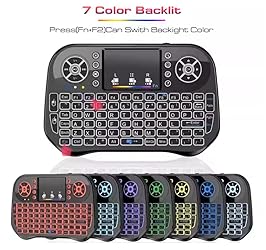
- Features: Bluetooth &2.4GHz wireless Keyboard with Touchpad Touchpad DPI adjustable functions Built-in high sensitive smart touchpad with 360 degree flip design Supports for the systems of Android, Windows, Mac OS, Lilux Distance of remote up to 10 meters bluetooth and 2.4G RF wireless technology, high stability Quality and design improved, more beautiful, more comportable for using Amount of key:92 Control distance:10m Battery type:lithium battery TX Power:+5db Max Operational voltage: 3.3V Operating current:50mA (on), 1mA(sleep mode) Charging current : Material:Plastic and Silicone Coulor:Black Package includes: - 1 * i10 Pro Wireless Keyboard & Mouse Combo - 1 * USB wireless receiver - 1 * User Guide - 1 * Charging data cable Note: 1. The usb receiver is placed into the keyboard which is beside of the battery slot 2. Fn + F2 turn on/off backlight. Fn+F1 enter 2.4G Connection mode Long press Fn+F3 enter Bluetooth Connection mode
S/ 106.86
60% OFF
S/ 42.73
IMPORT EASILY
By purchasing this product you can deduct VAT with your RUT number
S/ 106.86
60% OFF
S/ 42.73
 Llega en 5 a 10 días hábiles
con envío
 Tienes garantía de entrega
Conoce más detalles
Bluetooth & 2.4G Dual Mode:It builts in bluetooth and has a 2.4Ghz USB dongle. The Bluetooth no need dongle and makes the connection faster and more stable.(Long press Fn+F3 enter Bluetooth Connection mode). The 2.4G need plug 2.4Ghz dongle into the USB devices(Fn+F1 enter 2.4G Connection mode) ,operating distance can reach 33ft/10M. Widely Compatibility:This A8 mini keyboard can be used as a remote control for Android TV Box, Smart TV, HTPC, PC, Xbox360/Ps3, Ps4, or a portable keyboard for laptops, phones, tablet, etc. Backlitght Memory: This Mini Keyboard has been improved that the backlight to lock on with a color after turning it off then on. it has a Backlitght Memory function to lock the backlight color. How to Switch 7 Colors Blacklight: Holding the FN key then press F2 to turn on the backlit , Shortcut switch:Holding Fn, then short press F3 for blue,red,green 3 backlit colors. For more colors:Holding the Fn key, then move up and down on the touchpad with fingers to switch colors you want. Note: Fn + Long press F3 at the same time (about 3 seconds) Until the indicator light flashes rapidly then enter Bluetooth Connection mode, Fn+ short Press F1 (about 1 second) enter 2.4G Connection mode.
Compra protegida
Disfruta de una experiencia de compra segura y confiable
![]() Garantía de entrega
Garantía de entrega
Con Tiendamia todas tus compras cuentan con Garantía de Entrega o devolución total de tu dinero.
Compras 100% seguras y garantizadas, para que pidas lo que sueñas y lo recibas del mundo a tu puerta.
Saber más.
Visa

Mastercard

American Express

