


 Garantía de entrega






SKU/Artículo: AMZ-B0F882JTLX
GLOBELEC
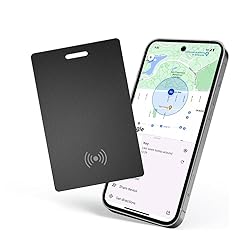
Wallet Finder for Android,Bluetooth Tracker Item Works with Google Find My Device(Find Hub)App,IP68 Waterproof Google Certified Wallet Tracker Card,Wireless Rechargeable Tracking Tag,for Luggage,Tags
Detalles del producto
Disponibilidad:
En stock
En stock
Peso con empaque:
4.03 kg
4.03 kg
Devolución:
Sí
Sí
Condición
Nuevo
Nuevo
Producto de:
Amazon
Amazon
Viaja desde
USA
USA
Sobre este producto
- Bluethooth tracker for android wallet card
S/ 77.53
31% OFF
S/ 53.46
IMPORT EASILY
By purchasing this product you can deduct VAT with your RUT number
S/ 77.53
31% OFF
S/ 53.46
 Llega en 5 a 10 días hábiles
con envío
 Tienes garantía de entrega
Conoce más detalles
【Find Nearby】Bluetooth tracker card for android built-in speaker on the card emits a loud ringtone (80-100dB) and quickly locates nearby items (within an 80 meter Bluetooth range). Relying on the Google "Find My Devices" network, even if the card is forgotten or far away, its location can be tracked globally and shared with friends and family 【Wireless Rechargeable】Android tracking card the built-in battery supports wireless charging and can work continuously after a single charge. No need for frequent battery replacement, providing long-term reliable tracking guarantee (note: wireless charger needs to be purchased separately) 【Easy Pairing 】Wallet Tracker for Android the setup process is extremely simple (about 30 seconds), just activate Bluetooth and add the device in the Google Search Center app to complete pairing 【Waterproof】 The android wallet tracker With an IP68 can easily handle rainwater and splashes. Even if your wallet is lost in the rain, it can still function normally 【Protect your privacy】The Google Find Hub network location data is transmitted anonymously through encrypted network and will not be stored on the card itself or Google servers, ensuring user privacy and security Check permission settings: Make sure Google Play Services: Enable "Nearby devices" permissionMake sure Google Play Store: Enable "Nearby devices" permission and"Display over other apps" permission Steps for manual connection: -> Open your phone settings Google>-> All services-> Devices->Open>Search for nearby devices->Nearby devices available
Compra protegida
Disfruta de una experiencia de compra segura y confiable
![]() Garantía de entrega
Garantía de entrega
Con Tiendamia todas tus compras cuentan con Garantía de Entrega o devolución total de tu dinero.
Compras 100% seguras y garantizadas, para que pidas lo que sueñas y lo recibas del mundo a tu puerta.
Saber más.
Visa

Mastercard

American Express

