


 Garantía de entrega






SKU/Artículo: AMZ-B0DZ69JBCH
HCDZ
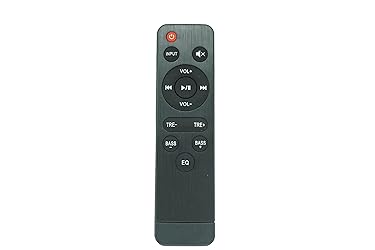
HCDZ Universal Replacement Remote Control Compatible for Passau S28R S28CS Full-Range Divers, Bass/Treble Adjustable Home Theater Sound Bars TV Speaker, Easy Use
Detalles del producto
Disponibilidad:
En stock
En stock
Peso con empaque:
1.51 kg
1.51 kg
Devolución:
No
No
Condición
Nuevo
Nuevo
Producto de:
Amazon
Amazon
Viaja desde
USA
USA
Sobre este producto
- What's in the package: 1 X remote control , no battery and instructions included it will work straight away when new batteries inserted ●Do not leave the remote in an extremely hot or humid place. ●Do not use a new battery with an old one. ●Do not expose the remote sensor to direct sunlight or lighting apparatuses. Doing so may cause a malfunction. ●If you don't use the remote for an extended period of time, remove the batteries to avoid possible damage from battery leakage and corrosion. Troubleshooting: Remote control malfunctions Replace remote control batteries Check battery terminals Remote is out of range, move closer to the device Remove any obstructions between remote and IR sensor of the device Make sure the power cord to your device is plugged in and turned on
S/ 96.97
31% OFF
S/ 66.88
IMPORT EASILY
By purchasing this product you can deduct VAT with your RUT number
S/ 96.97
31% OFF
S/ 66.88
 Llega en 15 a 25 días hábiles
con envío
 Tienes garantía de entrega
Conoce más detalles
The remote control is designed for intuitive operation of compatible devices, offering essential functions for navigation and volume adjustment. Power Source: Requires 2×AAA batteries (not included). Pairing: Automatically syncs with compatible devices within a 8-meter range (infrared). Maintenance: 1.Clean buttons with a dry cloth. Avoid moisture. 2.Replace batteries when responsiveness declines. Troubleshooting: No Response: 1. Check battery orientation and charge. 2.Ensure the remote is pointed at the device’s receiver. 3. Reset by removing batteries for 30 seconds. Unintended Functions: 1.Verify compatibility with your device. 2. Avoid interference from strong light sources or other remotes.
Compra protegida
Disfruta de una experiencia de compra segura y confiable
![]() Garantía de entrega
Garantía de entrega
Con Tiendamia todas tus compras cuentan con Garantía de Entrega o devolución total de tu dinero.
Compras 100% seguras y garantizadas, para que pidas lo que sueñas y lo recibas del mundo a tu puerta.
Saber más.
Visa

Mastercard

American Express

