




 Garantía de entrega




SKU/Artículo: AMZ-B0DGWXW19D
Arkidyn Plus
Microsoft Surface Pen - Surface Pro Pen Stylus with 4096 Levels Pressure, USB-C Fast Charge for Microsoft Surface Pro 11/10/9/8/X/7+/7/6/5/4/3, Surface Go 4/3/2/1, Surface Laptop/Studio/Book 4/3/2/1
Color:
Black
Detalles del producto
Disponibilidad:
En stock
En stock
Peso con empaque:
0.30 kg
0.30 kg
Devolución:
Sí
Sí
Condición
Nuevo
Nuevo
Producto de:
Amazon
Amazon
Viaja desde
USA
USA
Sobre este producto
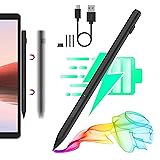
- Stylus Pen for Windows. Write and draw naturally. Create without limitsHighlights:Palm Rejection4096-level pressure sensitivitySupport 60 Writing HoursReplaceable pen nibMagnetic AdsorptionRight click and eraser buttonsThe pen contains a rechargeable batteryLED charging indicatorJust press any button to start writingNo drivers or Bluetooth requiredPowerful & Comprehensive Surface stylus4096 Pressure Sensitivity4096 levels of pressure sensitivity and low initial activation force,increase the intensity to draw thick lines and reduce the intensity to draw thin lines, allowing for shading or increased detail when drawing.Palm RejectionUpgraded stylus pen enables you rest your palm on the screen while drawing without glove, more comfortable & real than capacitive styluses.Easy to Replace TipThis surface pro pen uses the original tip, which has a long service life and can better protect the screen. In addition, it also comes with 3 additional replaceable stylus tips to use. Gently pull out the old tip and insert the new one right into the tiny hole.Shortcut ButtonsLong pressing the up key can perform the eraser function; long pressing the down key can perform the color picker function (also equivalent to the right mouse button)How do I use the right-click function?Touch the Microsoft Surface Pen tip to the screen --> Press the right button --> A circle will appear around the pointer --> Remove the Microsoft Surface Pen tip from the screen --> A menu will automatically appear.No lagging, No skips, No noiseInk flows out in real time, write and draw naturally, it not only improves the precision and sensitivity of painting and writing,and most importantly it won't leave scratches after a long-time use.Double Magnets2 stronger built-in magnets, ready to attach securely to your Surface tabletUltra-long Battery LifeIntegrated with the newest power-save program, with just 40 minutes of charging, you can enjoy a remarkable 60 hours of usage. And the pen automatically powers off after 10 minutes of inactivity to preserves battery life.When the indicator light is red, it means the battery is low/charging. When the indicator light is green, it means it is fully charged/in use.
S/ 147.51
55% OFF
S/ 67.05
IMPORT EASILY
By purchasing this product you can deduct VAT with your RUT number
S/ 147.51
55% OFF
S/ 67.05
 Llega en 5 a 10 días hábiles
con envío
 Tienes garantía de entrega
Conoce más detalles
A Must-have Accessory for Surface Owner: This Surface Pen is adopted Microsoft Pen Protocol technology, available for Microsoft MPP protocol devices and some models from HP, ASUS, DELL, Acer, and SONY. Surface Model List: Surface Pro 11th Edition, Surface Pro 10, Surface Pro 9, Surface Pro 8, Surface Pro X, Surface Pro 7+/7, Surface Pro 6, Surface Pro 5th Gen, Surface Pro 4, Surface Pro 3, Surface Laptop 6/5/4/3/2/1, Surface Studio, Surface Book, Surface Go. Type-C Fast Charge & Smart Standby: The Surface Pro stylus pen introduces a Type-C fast charging design and built-in rechargeable battery, enabling you to recharge it quickly. This microsoft surface pro pen only takes 30 minutes to fully charge for 60 hours of battery life. Automatically turn in "Sleep Mode" if idle for 10 minutes to save power.Perfect for students, business professionals, and creators who take notes and draw frequently. 4096 Pressure Sensitivity & Premium Feel : This Microsoft Surface pen uses the original nib and uses 4096-level pressure-sensitive technology, Surface pro stylus can express shades of color according to the degree of pressure. Ink flows out in real time with no lag or latency. It gives you a smoother experience. The overall streamlined aluminum alloy seamless body design is ergonomically designed and more comfortable to hold. Palm Rejection & Magnetic Design: The Surface Pro pen with palm rejection, allowing you to comfortably rest your hand on the screen while creating. The magnetic design enables the surface pen to be securely attached to the tablet, making it more convenient to store and locate while in use. Eraser and Right-click Functions & 3 Replaceable Pen Tip: The Surface Pen comes with eraser and right-click functions, the lower key is the right mouse button, and the upper key is the eraser, which helps you to improve your work efficiency. Just press any button to wake up the surface pen and start writing, no Bluetooth or drivers required. Easy to Replace Tip:3 extra nibs for easy replacement at any time. What’s in the box: 1x Microsoft pen with tip, 1x USB-C cable, 3x Replacement tip, 1x User manual, 1 x Dust Cover for Charging Port. What's more, quick reply in (24 hours), worry-free (12-month) warranty.
Compra protegida
Disfruta de una experiencia de compra segura y confiable
![]() Garantía de entrega
Garantía de entrega
Con Tiendamia todas tus compras cuentan con Garantía de Entrega o devolución total de tu dinero.
Compras 100% seguras y garantizadas, para que pidas lo que sueñas y lo recibas del mundo a tu puerta.
Saber más.
Visa

Mastercard

American Express

