




 Garantía de entrega






SKU/Artículo: AMZ-B0D6RCR174
SSK
SSK NVMe SSD Cloner, M.2 Duplicator Dual Bay NVMe Enclosure, Tool-Free 20Gbps USB3.2 Gen 2X2 SSD to USB Adapter M.2 Docking Station for M Key PCIE NVMeSSD Reader Supports Offline Clone
Detalles del producto
Disponibilidad:
En stock
En stock
Peso con empaque:
0.30 kg
0.30 kg
Devolución:
Sí
Sí
Condición
Nuevo
Nuevo
Producto de:
Amazon
Amazon
Viaja desde
USA
USA
Sobre este producto
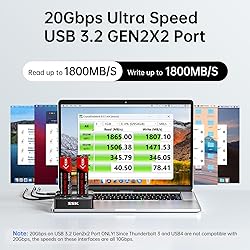
- Introducing the SSK Dual NVMe Enclosure—the ultimate solution for versatile and high-performance storage needs. Designed to support both M Key and B+M Key NVMe SSDs, this dual bay NVMe enclosure offers unparalleled adaptability. Whether you're juggling multiple drives or frequently swapping SSDs, the M.2 dock ensures seamless operation. Powered by the JMS586U chip, this enclosure allows you to run two SSDs simultaneously without any performance degradation, making it ideal for multitasking and handling large files or intensive applications with ease.Experience unmatched speed with the SSK NVMe duplicator. Equipped with USB 3.2 Gen 2x2 interface, this M.2 reader delivers ultra-fast data transfer speeds of up to 20Gbps. Whether you’re transferring large files, backing up essential data, or accessing high-speed storage, this SSD dock is the perfect SSD to USB adapter for speed enthusiasts. Say goodbye to delays and experience the efficiency of the fast NVMe duplicator.Simplify your data management with the one-click SSD cloner. The SSK NVMe dock doubles as a standalone SSD cloner, allowing you to clone drives effortlessly with a single button press—no computer needed. This NVMe cloner streamlines the process of duplicating data, making it convenient for both professionals and everyday users. Whether upgrading storage or creating backups, the M.2 duplicator handles it all efficiently, saving you valuable time and effort.Enjoy optimized speed and stability for professional performance. The SSK dual NVMe enclosure supports the USAP protocol, ensuring faster and more reliable data transfer. This makes it a highly dependable SSD to USB adapter for professionals who demand consistent and stable performance. Whether working with large video files, complex projects, or vast data sets, the NVMe duplicator provides the speed and reliability you need.Safeguard your data with advanced smart technology. The SSK NVMe dock features built-in S.M.A.R.T technology to monitor your SSD’s health, ensuring optimal performance. Additionally, TRIM support keeps your SSD running efficiently over time. Together, these technologies protect your data and ensure that your NVMe duplicator remains reliable and effective for all your storage needs.Benefit from enhanced cooling and effortless installation. The open-frame design of the SSK M.2 dock makes installing SSDs easy while also providing superior heat dissipation. This feature is crucial when using high-performance SSDs that can generate significant heat during operation. The design of this M.2 dock ensures that heat is managed efficiently, protecting your drives from potential damage. For safety, it’s advised to allow the SSDs to cool down before handling them after heavy use.Enjoy seamless connectivity right out of the box. The SSK dual NVMe enclosure comes fully equipped with a 20Gbps USB-C cable, a 10Gbps USB-A cable, and a 12V/2A power adapter, making it a complete NVMe to USB adapter solution. These accessories allow you to easily connect your NVMe dock to various devices, ensuring a quick and hassle-free setup. Just format your new SSDs, and you’re ready to tap into the full capabilities of this powerful NVMe duplicator.In summary, the SSK Dual NVMe Enclosure is your go-to solution for versatility, speed, and reliability in data management. Whether using it as a dual NVMe enclosure, a standalone SSD cloner, or a high-speed SSD to USB adapter, this M.2 dock is engineered to meet your demands.
S/ 410.18
60% OFF
S/ 164.06
IMPORT EASILY
By purchasing this product you can deduct VAT with your RUT number
S/ 410.18
60% OFF
S/ 164.06
 Llega en 5 a 10 días hábiles
con envío
 Tienes garantía de entrega
Conoce más detalles
Versatile Dual NVMe Enclosure: This dual bay NVMe enclosure supports both M Key and B+M Key NVMe SSDs. Powerful JMS586U chip operates two SSDs simultaneously for multitasking without performance drop. Note: M.2 dock supports NVMe SSD ONLY, does not support SATA and other non-NVMe SSDs Ultra-Fast M.2 Reader: Equipped with a USB 3.2 Gen 2x2 interface, this NVMe duplicator offers blazing speeds up to 20Gbps, making this SSD dock an ideal SSD to USB adapter for those needing speed One-Click SSD Cloner: SSK NVMe dock doubles as a standalone nvme cloner, allowing you to clone drives with just a single button press. No need computer—this M.2 duplicator handlesall. Note: Please ensure both drives are NVMe protocol to use the cloning feature. SATA not supported. Target drive will be erased and cloned to match the source drive exactly Optimized Speed and Stability: With USAP protocol support, this dual NVMe enclosure ensures faster data transfer, making it a reliable ssd to usb adapter for professionals Secure Data with Smart Technology: Safeguard your data with built-in S.M.A.R.T monitoring your SSD's health, and TRIM optimizing performance and maintaining drive efficiency. This ensures your NVMe duplicator remains reliable and effective over time Enhanced Cooling and Easy Installation: The open design of this M.2 dock allows for easy SSD installation and effective heat dissipation. Note: High-performance SSDs may heat up during operation. It's advised to allow the SSDs to cool down before handling them after heavy use Seamless Connectivity: This dual NVMe enclosure comes with a 20Gbps USB-C and a 10Gbps USB-A cable, plus a 12V/2A power adapter, making it a fully equipped NVMe to usb adapter. Just format your new SSDs, and you're ready to go with this NVMe dock Clone Function Note:The target drive capacity has to be at least equal or larger than the source drive. Only NVMe drives are supported for cloning; SATA or other protocols are not supported. Please be carefully to press the Clone button since this will delete all data in the target drive and make sure the data cable is unplugged form the dock before cloning
Compra protegida
Disfruta de una experiencia de compra segura y confiable
![]() Garantía de entrega
Garantía de entrega
Con Tiendamia todas tus compras cuentan con Garantía de Entrega o devolución total de tu dinero.
Compras 100% seguras y garantizadas, para que pidas lo que sueñas y lo recibas del mundo a tu puerta.
Saber más.
Visa

Mastercard

American Express

