




 Garantía de entrega




SKU/Artículo: AMZ-B0CMZYJX92
HCDZ
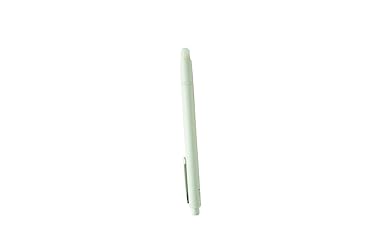
HCDZ Replacement IR Pen for Interactive Projector, Set for 2 (Mimio 280I)
Model:
Mimio 280I
Detalles del producto
Disponibilidad:
En stock
En stock
Peso con empaque:
0.30 kg
0.30 kg
Devolución:
No
No
Condición
Nuevo
Nuevo
Producto de:
Amazon
Amazon
Viaja desde
USA
USA
Sobre este producto
- It contains 2 pieces of pen ; Each Light Pen is powered by two AAA-size batteries. 15.2 cm L x 1.5 cm W (6.0 in. L x 0.6 in.W), 34 g (1.2 oz) (without battery)
S/ 162.64
44% OFF
S/ 90.36
IMPORT EASILY
By purchasing this product you can deduct VAT with your RUT number
S/ 162.64
44% OFF
S/ 90.36
 Llega en 15 a 25 días hábiles
con envío
 Tienes garantía de entrega
Conoce más detalles
When the projector is on and connected to a computer, the Light Pen can be used to open and close programs on your computer by tapping the projection screen. The Light Pen also acts as a digital brush pen so you can highlight and write notes on your presentation, an imported background, or on a white screen using the whiteboard mode. Writing options include three pen ink colors, a highlighting option, and various drawing tools can help you keep track of different marks and edits made. The dual pen tool allows two users to edit the projected imaged simultaneously. These images and notes can then be saved to your computer for later review or sharing. The interactive toolbar located on your projection allows you to switch between brush pen mode and mouse mode. The Light Pen's mouse mode allows you to use the pen as a mouse and click on different items on your computer's screen while standing at a distance from the projection. The touch control pen tip lights up when sending signals so you can tell when the pen is on or off. Each Light Pen is powered by two AAA-size batteries.
Compra protegida
Disfruta de una experiencia de compra segura y confiable
![]() Garantía de entrega
Garantía de entrega
Con Tiendamia todas tus compras cuentan con Garantía de Entrega o devolución total de tu dinero.
Compras 100% seguras y garantizadas, para que pidas lo que sueñas y lo recibas del mundo a tu puerta.
Saber más.
Visa

Mastercard

American Express

