


 Garantía de entrega





SKU/Artículo: AMZ-B0CG9M5RPD
Zyyini
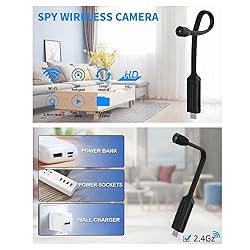
Zyyini USB Plug Camera, USB Plug Camera Hidden Camera, 1080p HD Security Cameras Small Camera with Night Vision, Motion Detection, Remote Viewing
Detalles del producto
Disponibilidad:
En stock
En stock
Peso con empaque:
0.30 kg
0.30 kg
Devolución:
Sí
Sí
Condición
Nuevo
Nuevo
Producto de:
Amazon
Amazon
Viaja desde
USA
USA
Sobre este producto
- Specification: Item Type: USB Plug Camera Material: ABS Color: Black Interface: USB Resolution: 1920x1080P : 2.4GHz Or 4G Card Slot: Maximum 128G (Without Micro Storage Card) Features: 1. HD Night Vision 2. Motion Detection 3. Remote Viewing How to Use: Remove the product and refer to the instructions for use PackageList: 1 xUSB Plug Camera 1 x Instruction Manual 1 x Card Pin Note: If you need more accurate alarm messages, you can turn on AI Human Recognition. Using AI algorithm, the camera will notify you when a human body or animal is recognized. You can keep abreast of abnormal situations. (AI Human Recognition is chargeable)
S/ 134.49
31% OFF
S/ 92.76
IMPORT EASILY
By purchasing this product you can deduct VAT with your RUT number
S/ 134.49
31% OFF
S/ 92.76
 Llega en 5 a 10 días hábiles
con envío
 Tienes garantía de entrega
Conoce más detalles
HD VIDEO: USB camera has a built in 14mm / 0.55in ultra compact camera lens, a metal hose that makes it easy to adjust the angle and place the camera in the right position, and an image sensor that captures HD video with accurate color reproduction. REMOTE ACCESS: Compatible with for Android, for IOS and for PC. With a (2.4GHz or 4G) connection, you can watch live images anytime, anywhere with the app. Supports live streaming and recording without connection. The PC version of the app supports multi camera simultaneous live monitoring. MOTION DETECTION: USB camera in motion detection mode, when any moving object is detected in the surveillance area, the camera starts recording and sends an alarm message. If you need more accurate alarm messages, you can turn on AI Human Recognition. LARGE STORAGE: USB plug camera supports local storage and cloud storage. Local storage can be up to 128 GB. Videos triggered in motion detection mode will be automatically uploaded to the cloud. This keeps your data and intact. EASY TO USE: 1080P HD security camera is easy to use, plug the camera into a power source. Download for APP Pro on your phone and add the camera to your account. Connect the camera to . you can also easily set up monitoring areas and schedules as needed.
Compra protegida
Disfruta de una experiencia de compra segura y confiable
![]() Garantía de entrega
Garantía de entrega
Con Tiendamia todas tus compras cuentan con Garantía de Entrega o devolución total de tu dinero.
Compras 100% seguras y garantizadas, para que pidas lo que sueñas y lo recibas del mundo a tu puerta.
Saber más.
Visa

Mastercard

American Express

