


 Garantía de entrega







SKU/Artículo: AMZ-B0BCHR33RW
XTACO
TIK Tok Remote Control, Tiktok Button Wireless Scrolling Ring Bluetooth Control Page Turner with Charging Case Compatible with iOS/Android (Black)
Color:
Black
Detalles del producto
Disponibilidad:
En stock
En stock
Peso con empaque:
0.30 kg
0.30 kg
Devolución:
No
No
Condición
Nuevo
Nuevo
Producto de:
Amazon
Amazon
Viaja desde
USA
USA
Sobre este producto
- Product Functions: Scroll video up and down or left and right, adjust volume, pause, lock screen, selfie, e-book page turning. Product Details: Color: Black/Pink Bluetooth version: Ver. 5.0 Bluetooth name: D01 Charging interface: Type-C Input current: DC 5V Ring controller battery: 25mAh Ring controller charging time: about 1 hour Charging box battery capacity: 200mAh Charging time of charging case: about 1.5 hours Wireless working range: ≤10M (no obstacles) Package List: Bluetooth controller Charging case Type-C cable Manual
S/ 54.24
31% OFF
S/ 37.40
IMPORT EASILY
By purchasing this product you can deduct VAT with your RUT number
S/ 54.24
31% OFF
S/ 37.40
 Llega en 25 días hábiles o más.
con envío
 Tienes garantía de entrega
Conoce más detalles
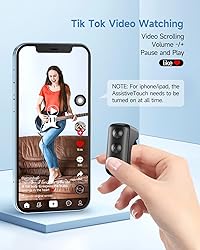
【TIK Tok Button】 You don't need to use your finger to slide videos on Tik Tok any more. This Bluetooth remote could scroll videos, double click to "like", "pause"&"play". Watching Tik Tok videos will be easier, use with a mobile phone holder or just make your phone fixed where you want, no need to ever to touch your phone again, free your hands! 【With Charging Case】Use time lasts for 10 hours from single charge and total 86 hours with charging case. Providing convenient charging way with no strings attached. 【High Quality & Smart Wear Design】The video controller adopts ABS plastic, which is safe and skin-friendly, ergonomic ring design, and comfortable and beautiful to wear. The perfect gift for her or his birthday, valentines and more. 【Perfectly Compatible】Bluetooth Connection,compatible with iPhone, iPad, iPod models, Android smartphones and tablets. Record wonderful moments with this handy little gadget. {SMALL TIPS: 1.Non-Android phone needs to open Settings>Accessibility>touch>turn on Assistive touch before it can be used normally. 2. You need make sure the IOS vesion is above V14.8} 【24H Customer Support】Backed by reliable customer service for troubleshooting, replacements, and warranty claims, ensuring peace of mind with your purchase.
Compra protegida
Disfruta de una experiencia de compra segura y confiable
![]() Garantía de entrega
Garantía de entrega
Con Tiendamia todas tus compras cuentan con Garantía de Entrega o devolución total de tu dinero.
Compras 100% seguras y garantizadas, para que pidas lo que sueñas y lo recibas del mundo a tu puerta.
Saber más.
Visa

Mastercard

American Express

