


 Garantía de entrega






SKU/Artículo: AMZ-B0FWK46MPF
Bawanfa Plus
XD Card Reader, SD Card Reader for iPhone, 3 in 1 SD/TF/XD Memory Card Reader Adapter for Lightning/USB C/USB A Device, XD Picture Card Adapter iPhone 17/16/15/14, iPad, MacBook, Android, Camera & PC
Color:
Black
Detalles del producto
Disponibilidad:
En stock
En stock
Peso con empaque:
0.30 kg
0.30 kg
Devolución:
Sí
Sí
Condición
Nuevo
Nuevo
Producto de:
Amazon
Amazon
Viaja desde
USA
USA
Sobre este producto
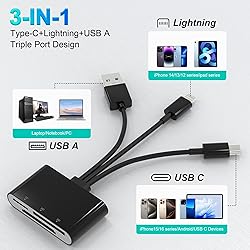
- 3 in 1 Lightning+USB A+USB C XD/SD/TF Card ReaderPlug and play instantly! This versatile XD card reader supports seamless two-way transfer, allowing you to batch upload photos and videos from your memory card to your iPhone, iPad, or computer — or easily save files from your devices back to an XD, SD, or TF card.Triple Cable + Triple Card SlotThis multi-functional memory card reader features three dedicated card slots: XD card slot, SD card slot, and TF (MicroSD) card slot. It is fully compatible with SD, SDHC, SDXC, MicroSD, MicroSDHC, MicroSDXC, and XD memory cards. Whether you use a camera, GoPro, drone, dash cam, or smartphone, this reader meets all your transfer needs in daily life and on the go.The reader comes with three built-in ports: USB-C, Lightning, and USB-A, offering wide compatibility with iPhone, iPad, Mac, Windows PC, and Android devices.USB C SD Card ReaderThe USB-C port connects directly to modern devices such as iPhone 16/15 series, Android phones, tablets, and laptops with USB-C, offering fast data access without extra adapters.Lightning to SD Card ReaderSimply plug the Lightning connector into your iPhone or iPad to quickly import photos and videos. It works seamlessly with the Files app and Photos app — no extra software required.USB Memory Card AdapterUse the USB-A port to connect to computers, laptops, or USB hubs for easy file management, making it a practical USB memory card adapter for both Mac and Windows systems.Important Notes:Before use, ensure your memory card is formatted to a supported file system such as exFAT. NTFS is not supported.This compact card reader includes SD, TF, and XD card slots, but only one card can be read at a time. Please do not insert two cards simultaneously.For Android devices: OTG function must be supported and enabled. Insert the memory card into the reader first, then connect to your device. When changing cards, unplug and reconnect the reader.For iOS devices: iOS 13 and later support full two-way transfer. For iOS 9.2–12.4, only import from card to iPhone/iPad is available.If the card is not recognized, please recheck formatting and connection sequence.
S/ 131.75
55% OFF
S/ 59.88
IMPORT EASILY
By purchasing this product you can deduct VAT with your RUT number
S/ 131.75
55% OFF
S/ 59.88
 Llega en 10 a 15 días hábiles
con envío
 Tienes garantía de entrega
Conoce más detalles
【Triple Slot + Triple Port – Universal Compatibility】Featuring three card slots (XD, SD, and TF), this SD card reader supports SD/SDHC/SDXC, MicroSD, MicroSDXC, MicroSDHC, and XD memory cards. With Lightning, USB-C, and USB-A cables included, it connects directly to iPhone, iPad, Android phones, PC, and Mac—making it a truly all-in-one XD picture card adapter. 【High-Speed Data Transfer & exFAT Support】This micro SD card reader for iPhone delivers ultra-fast transfers at up to 480Mbps, moving photos and videos from your camera to your phone in seconds. It supports JPEG, RAW, H.264, MPEG-4, and works seamlessly with exFAT-formatted cards (NTFS not supported). Quickly backup large files without wasting time. 【Supports 2TB & Bidirectional Transfer】Read cards up to 2TB and manage storage freely. This sd card reader usb c and lightning not only imports from card to iPhone/iPad, but also exports from device to card—a true two-way micro sd card reader for iPhone that saves phone space. 【Plug & Play, No App Needed】True plug-and-play convenience. This xd picture card adapter requires no apps, drivers, or internet—just connect to your device and access files instantly in Photos or File Manager. Works with iOS, Android, Windows, and more. 【Designed for Reliability & Easy Use】Built for daily use with clear usage guidance: 1) Format card to exFAT first. 2) Read one card at a time (SD, TF, or XD). 3) For Android: enable OTG, insert card first, then connect. A dependable olympus sd card adapter for photographers on the go.
Compra protegida
Disfruta de una experiencia de compra segura y confiable
![]() Garantía de entrega
Garantía de entrega
Con Tiendamia todas tus compras cuentan con Garantía de Entrega o devolución total de tu dinero.
Compras 100% seguras y garantizadas, para que pidas lo que sueñas y lo recibas del mundo a tu puerta.
Saber más.
Visa

Mastercard

American Express

