


 Garantía de entrega







SKU/Artículo: AMZ-B0F9KR1Y7J
Shenzhen Qixun Space Technology Co., Ltd
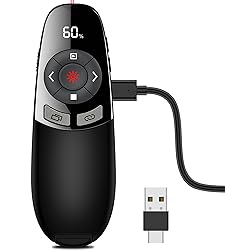
Rechargeable Wireless Presentation Clicker with Red Laser Pointer and Battery & Timer Display, Powerpoint Clicker for PC Mac Keynote Google, Presenter Remote PPT Remote for Powerpoint Presentations
Size:
Re-Red-Timer-Battery Display
Detalles del producto
Disponibilidad:
En stock
En stock
Peso con empaque:
0.30 kg
0.30 kg
Devolución:
Sí
Sí
Condición
Nuevo
Nuevo
Producto de:
Amazon
Amazon
Viaja desde
USA
USA
Sobre este producto
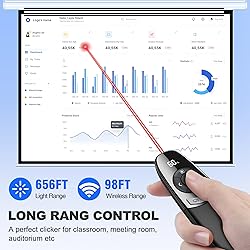
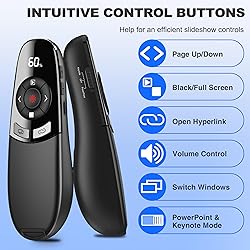
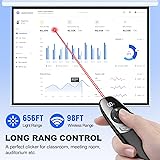
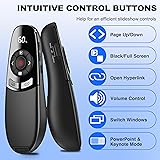
- ◆Performance Characteristics: Wireless clicker for presentations with multifunctional design, PowerPoint presentations, Hyperlinks, Volume Control, Window Switch, Black/Full Screen, Page Up/Down etc. The compact design allows you to put remote clicker for presentations into briefcase or pockets, more comfortable and more natural speech, Red Red light design fully to attract your audience. TIPS: Please don't point the beam at people or animals. ◆Specification: Puntero laser para presentaciones Supported System: Windows 7/8/10/Mac OS/Linux/Android 4.3 or above Slide advancer with laser pointer Supported Software: PowerPoint, Google Slides, iWork (Keynote/Numbers/Pages), Prezi, Website, ACD See, Word, Excel etc. Slide clicker for laptop built-in 450mAh battery, charging 2.5H to provide serval weeks of use, not having to bother with constantly replacing batteries Low Power Reminder: LED will flash green to remind you the low battery Technology: Radio Frequency Frequency: 2.4GHz Battert Capacity: 450mAh Red Light Range: 656ft(200M) Wireless Control Range: 98ft(30M) Product Size : 14*4.5*3cm Package Weight: 75g ◆Package List: 1x Power Point Remote Clicker with Laser 1x Receiver 1x User Manual
S/ 212.50
55% OFF
S/ 96.59
IMPORT EASILY
By purchasing this product you can deduct VAT with your RUT number
S/ 212.50
55% OFF
S/ 96.59
 Llega en 5 a 10 días hábiles
con envío
 Tienes garantía de entrega
Conoce más detalles
【BATTERY & TIMER DISPLAY】The display of clicker for powerpoint presentations will show the battery level, the LED light will flash in green to remind low battery if less than 20%. Charging the presentation clicker in time, you won't miss any important presentations. And The laser pointer for presentations has a countdown vibration alert settings, the time can be set between 1-199 minutes, so that you can control the time precisely 【RECHARGEABLE POWERPOINT CLICKER】 Computer clicker built-in 450mAh battery, charging 2.5H to provide over 30 days of use, not having to bother with constantly replacing batteries. 【656FT LASER DISPLAY RANGE & 165FT WIRELESS PRESENTER】 RF 2.4GHz wireless presentation clicker with 656ft light range is better to show up on various backgrounds. Red light helps to highlight the point on PPT, easier to draw audience’s attention. 98ft wireless control range make you free to walk around and communicate with audience, get rid of the shackles of keyboard. A perfect slide advancer for classroom, meeting room, auditorium; also a laser pointer toy for your cat, dog 【PLUG & PLAY AND MULTIFUNCTIONAL PPT CLICKER】 This power point clicker wireless is super easy to use, just insert the wireless receiver into your device without downloading software. And it's a power point remote clicker with full function, like Hyperlinks, Volume Control, Window Switch, Black/Full Screen, Page Up/Down etc. The pointer clicker for presentation will be your perfect tool for presentation, teaching and meeting, also an ideal gift for your friends or family 【WIDELY APPLICABLE PRESENTER WITH ERGONOMIC DESIGN】 Presenter clicker wireless supported systems: Windows 7/8/10/Mac IOS/Linux/Android 4.3 or above; computer clicker for presentations supported software: PowerPoint, Keynote, Google Slides, iWork (Numbers/Pages), Prezi, Website, ACD See, Word, Excel, PDF etc. Ergonomic design, fits the curve of the hand, comfortable to hold. A good helper for teacher, tutor, lecturer and speaker 【WHAT YOU GET & CUSTOMER SERVICE】 1x Wireless Presenter Remote, 1x Receiver, 1x User Manual for Presentation Pointer. We are dedicated to providing customers with the best products and services. Please feel free to contact us if any problems. TIPS: ①Not recommended for TV/LED/LCD screen. ②Please don't point the beam of presentation clicker for mac at people or animals. ③The USB receiver is stored in the END of presenter clicker
Compra protegida
Disfruta de una experiencia de compra segura y confiable
![]() Garantía de entrega
Garantía de entrega
Con Tiendamia todas tus compras cuentan con Garantía de Entrega o devolución total de tu dinero.
Compras 100% seguras y garantizadas, para que pidas lo que sueñas y lo recibas del mundo a tu puerta.
Saber más.
Visa

Mastercard

American Express

