


 Garantía de entrega






SKU/Artículo: AMZ-B0DK39MZ2C
KIWITATA
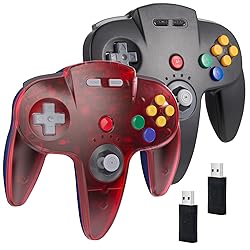
KIWITATA 2 Pack Wireless N64 USB Controller for Switch Games, 2.4ghz Rechargeable Remote Wireless Joystick Controller for Switch/Switch Lite/Switch OLED, MAC, PC Windows 7,8,10,11 Clear Red & Black
Detalles del producto
Disponibilidad:
En stock
En stock
Peso con empaque:
0.60 kg
0.60 kg
Devolución:
Sí
Sí
Condición
Nuevo
Nuevo
Producto de:
Amazon
Amazon
Viaja desde
USA
USA
Sobre este producto
- How to pair on the switch: 1.Click the menu “System settings “by Switch Joypad , find the icon”Controllers and Sensors” and click the button“ Pro Controller Wired Communication" must be ON status. 2.Plug the receiver into your switch and the red led starts flashing, press and hold the "SYNC" button on the receiver until it fast-blinking. 3. Press the"Reset“ button on the top of the controller , the led on the controller starts flashing. 4. Press the" Start” button, the LED stays lit and the controller is connected. Product includes: 1* Red controller+ 1* Black controller 2* USB C Cable 2* USB receiver 2* User manual
S/ 301.37
31% OFF
S/ 207.83
IMPORT EASILY
By purchasing this product you can deduct VAT with your RUT number
S/ 301.37
31% OFF
S/ 207.83
 Llega en 10 a 15 días hábiles
con envío
 Tienes garantía de entrega
Conoce más detalles
【Wide Application】Wireless USB controller widely compatible with Switch/Switch Lite/Switch OLED. Specially works for old Classic N64 old school Online Games On TV or computer, including the USB receiver, it can work with your PC/MAC or Raspberry Pi via USB connection 【Classic N64 Design 】ERGONOMIC DESIGN HANDLE, Classic N64 style with "M" shape ,perfectly fit palms, all the buttons and controls make your hand very comfortable for long periods of gaming.Support game Emulator:Project 64,OpenEmu,MegaN64,Mupen64,Mupen64Plus FZ,RetroArch,ClassicBoy and SixtyForce etc. 【Long playing time】Great battery life for the recharge,build in 3.7V/500mA lithium Ion battery which can work continuously for over 10-15 hours. 2.4GHz Wireless technology and wireless range up 25 feets, with strong anti-interference capability that is better than having to sit on floor a foot away from the TV 【Precise joystick and motor shock 】High quality 3D analog stick with precise control, built-in rumble Pak and memory card port, compatible with most of game memory cards, and you can use a memory card and transfer to an SD card. Third party controller, not original N64 controller. But you can play most of retro N64 games very well,this better way to play your favorite N64 games in the 90’s on the Switch. Notice: For Switch, the button layout is different from the Pro controller. "Pro Controller Wired Communication" must be enabled before pairing.
Compra protegida
Disfruta de una experiencia de compra segura y confiable
![]() Garantía de entrega
Garantía de entrega
Con Tiendamia todas tus compras cuentan con Garantía de Entrega o devolución total de tu dinero.
Compras 100% seguras y garantizadas, para que pidas lo que sueñas y lo recibas del mundo a tu puerta.
Saber más.
Visa

Mastercard

American Express

