


 Garantía de entrega






SKU/Artículo: AMZ-B0CX1HLS54
Wonrabai
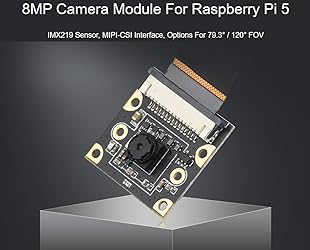
IMX219 Camera Module for Raspberry Pi 5, 8MP Pixels Pi5 Camera, MIPI-CSI Interface, 79.3° FOV (Field of View), Comes with Pi5 CSI Flexible Cable 200mm
Detalles del producto
Disponibilidad:
En stock
En stock
Peso con empaque:
0.30 kg
0.30 kg
Devolución:
No
No
Condición
Nuevo
Nuevo
Producto de:
Amazon
Amazon
Viaja desde
USA
USA
Sobre este producto
- IMX219 Camera Module for Raspberry Pi 5, 8MP, MIPI-CSI Interface, 79.3° FOV (Field of view) Specifications PIXELS: 8MP Sensor: IMX219 resolution: 3280 x 2464 CMOS size : 1/4 inch Aperture (F) : 2.0 Focal length: 2.85mm Field of view: 79.3° DISTORTION : <1% Lens Dimensions: 6.5x6.5mm Screw holes: 4 x screw holes, used for attachment, provides 3.3V power output Dimension: 25x24mm Comes with Online Tutorial and Online Development Resource: n9.cl/up454m Package Content Pi5-IMX219 camera and with Pi5 CSI Flexible Cable 200mm. Note: the RPi5 board is not included. Hardware Connection Note: To test the Camera, you need to connect a HDMI display or a DIS display for previewing. The connectors of the DSI interface (display) and the CSI interface (camera) look the same, please take care of it when you connect the camera. The CSI interface is placed between the Audio jack and the HDMI port. The CSI connector of Pi zero is beside the Power interface. If you use the Compute Module, please check the actual place of the carrier board. When Connects withRaspberry Pi 5, Place the metal surface of the FPC cable towards the wired network port, then connect to the CSI port. The Pi5 has two CSI ports; either port can be used for connection.
S/ 142.37
49% OFF
S/ 73.01
IMPORT EASILY
By purchasing this product you can deduct VAT with your RUT number
S/ 142.37
49% OFF
S/ 73.01
 Llega en 15 a 25 días hábiles
con envío
 Tienes garantía de entrega
Conoce más detalles
IMX219 Camera Module for Raspberry Pi 5, 8MP, MIPI-CSI Interface, 79.3° FOV (Field of view) 8MP PIXELS; IMX219 Sensor; 3280 x 2464 resolution Package includes Pi5-IMX219 camera and with Pi5 CSI Flexible Cable 200mm. Note: the RPi5 board is not included. Note: The connectors of the DSI interface (display) and the CSI interface (camera) look the same, please take care of it when you connect the camera. The CSI interface is placed between the Audio jack and the HDMI port. The CSI connector of Pi zero is beside the Power interface. If you use the Compute Module, please check the actual place of the carrier board. Comes with Online Tutorial and Online Development Resource in the below.
Compra protegida
Disfruta de una experiencia de compra segura y confiable
![]() Garantía de entrega
Garantía de entrega
Con Tiendamia todas tus compras cuentan con Garantía de Entrega o devolución total de tu dinero.
Compras 100% seguras y garantizadas, para que pidas lo que sueñas y lo recibas del mundo a tu puerta.
Saber más.
Visa

Mastercard

American Express

