










 Garantía de entrega




SKU/Artículo: AMZ-B0CSGBB2YV
Generic
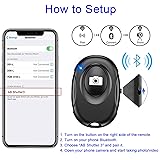
Wireless Camera Shutter Clicker | Camera Shutter Remote Control for iPhone & Android Smartphones | Wireless Remote Control Selfie Button - Includes Wrist Strap
Color:
Black
Detalles del producto
Disponibilidad:
En stock
En stock
Peso con empaque:
0.30 kg
0.30 kg
Devolución:
Sí
Sí
Condición
Nuevo
Nuevo
Producto de:
Amazon
Amazon
Viaja desde
USA
USA
Sobre este producto
- Smartphone camera Remote Shutter for iPhones and Tablets, Wireless Camera Remote Control Compatible with IOS and Android--Wrist Strap Included Specification: Connect name: AB Shutter 3 Bluetooth Version: 5.2 Transmit Frequency: 2.4 GHz – 2.4835 GHz Operation Range: 50 ft (15 m) Battery Model: CR2032
S/ 48.06
55% OFF
S/ 21.84
IMPORT EASILY
By purchasing this product you can deduct VAT with your RUT number
S/ 48.06
55% OFF
S/ 21.84
 Llega en 5 a 10 días hábiles
con envío
 Tienes garantía de entrega
Conoce más detalles
CONVENIENT AND EASY OPERATION: Just by pushing the on/off of the remote, open your phone Bluetooth function fine the "ab shutter3" from the list, and select to connect. Perfect for taking selfies and steady tripod shots. WIRELESS BLUETOOTH CONNECTION - Requires just the click of a button without your device in-hand to control your phone's shutter WORKS FROM A DISTANCE - Hands-free shutter control works up to 50 feet from your device for the perfect scan or selfie. How to use: Turn on the on/off button on the remote, open the Bluetooth function on the device, find the "ab shutter 3" from the list, select to pair, and finish the connection. and open your device camera to start taking photos/videos. Notes: 1. If the remote control cannot take photos and only adjusts the volume of the phone, please change the mobile phone settings and change the shutter key to the volume key. -- 2. The remote will change to sleep mode for power saving if it is not operated for 3 minutes, click the camera button and wait for two seconds to wake up.
Compra protegida
Disfruta de una experiencia de compra segura y confiable
![]() Garantía de entrega
Garantía de entrega
Con Tiendamia todas tus compras cuentan con Garantía de Entrega o devolución total de tu dinero.
Compras 100% seguras y garantizadas, para que pidas lo que sueñas y lo recibas del mundo a tu puerta.
Saber más.
Visa

Mastercard

American Express

