






 Garantía de entrega






SKU/Artículo: AMZ-B0CF5N2ZB3
BOXPUT
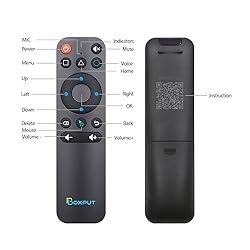
BOXPUT BPR1S Plus Air Mouse Remote 2026 New BT & 2.4G RF Replacement Remote with USB Receiver and Voice Control Supports 6-Axis Gyro IR Learning for Android TV Box TV Stick Smart Set Top Box
Style:
BT&2.4G 1S+
Detalles del producto
Disponibilidad:
En stock
En stock
Peso con empaque:
1.51 kg
1.51 kg
Devolución:
Sí
Sí
Condición
Nuevo
Nuevo
Producto de:
Amazon
Amazon
Viaja desde
USA
USA
Sobre este producto
- Hardware specifications◈ Model Number: BPR1S Plus◈ Transmission method: BT+IR+2.4G◈ Distance >10m◈ Net weight : 0.11 lb◈ Product Material : Plastic◈ Color: Black◈ Product Size: 6.47 x 1.6 x 0.78 inches◈ Product Category : BT Air Mouse Remote◈ Battery Type: AAA*2 (Not included)◈ Voice remote control: YES◈ Gyroscope: YES◈ IR full keys learning: YES◈ 2.4G Wireless: YES【Simple to use】The ergonomics of the air mouse remote control will replace the fixed computer mouse and infrared button remote control, allowing you to conveniently manage your computer and TV from the most comfortable position.【 Muti-connection methods】The BPR1S Plus BT voice remote control support BT + IR +2.4G connection, you can use this magic remote control to control most android device to enjoy your home entertainment.【Supports firmware upgrades】This air mouse remote for android tv box supports OTA, through the firmware upgrade, can solve the bugs and some compatibility problems.【Product Application Occasion】Andrid TV box, Android TV Stick, Smart projector, Some smart TVs, mobile phone, tablet computer,desktop computer, all-in-one, multi-scene application.【Incompatible devices】Fire Stick, DVB Box, ROKU Box, MAG Box, Apple Box and some LG S-amsung TVs.BT Pairing1. To pair another new device, press “OK” and “Back” at the same time till the light flashing.2. Keep the remote control within 1 meter of the device for faster pairing.3. Open BT searching, and pair with “BOXPUT | BPR1S Plus”.2.4G Pairing1. Keep pressing the “OK” and “Back” at the same time till the light flashes.2. Plug in the USB receiver and keep the remote near the USB receiver within 50 cm for faster pairing.3. The indicator light stops flashing to indicate successful pairing.IR Learning (All buttons)1. Press the button that needs to learn for 8 seconds till it’s flashing, then release (The indicator light on after flashing).2. Align the IR, press the button that would be learned, it shows success when the indicator light flashing.3. Repeat 1~2 to learn the other buttons.4. Press “Delete” and “Back” at the same time till the light flashes to reset IR.
S/ 137.61
49% OFF
S/ 70.58
IMPORT EASILY
By purchasing this product you can deduct VAT with your RUT number
S/ 137.61
49% OFF
S/ 70.58
 Llega en 5 a 10 días hábiles
con envío
 Tienes garantía de entrega
Conoce más detalles
【Full IR Learning & Universal Control】The BPR1S Plus remote supports IR learning for all buttons, making it compatible with most AOSP devices, Android smart TVs, and some ATV devices. Buttons without IR learning function in 2.4G/BT mode. Once IR learning is complete, the power button prioritizes sending IR signals. Works seamlessly as a replacement USB remote control for TV or remote for Android box. 【Simple Voice Input】Easily search TV programs with the built-in voice assistant. In 2.4G mode, voice works with Android TV and ATV devices; in BT mode, it’s compatible with select devices like TCL Smart TV, Shield TV, HAKO mini, and Google TV. Voice commands work in supported apps, allowing your TV box to be controlled smoothly with the BT remote. 【Wireless 2.4G RF & Plug-and-Play】This remote comes with a USB receiver for easy setup. Just plug it in and insert two AAA batteries (not included) – no drivers or complicated programming required. Enjoy stable control up to 10 meters, ideal for use as a PC monitor remote, USB remote for TV Box, or remote with USB controller for Raspberry. 【Precise Pointing】The BPR1S Plus replacement Remote Control helps to accurately remote control TV or PC with 6-axis gyroscope sensor. Hold the air mouse remote and turn your wrist, it can be converted into the movement of the cursor on the screen, allowing you to remotely control computers, TV Box, TV stick and other entertainment equipment. 【Firmware Description】This newly upgraded BPR1S PLUS remote control comes with two firmware versions. The default version is the standard version, suitable for TV boxes, TV sticks, and TVs. The other version is the PC version, designed for computers and tablets. To switch the remote to PC mode, press and hold both the "OK" button and the "Mouse" button until the indicator light blinks once. To switch back to the standard mode, repeat this process. 【Attention – Not Compatible Devices】This universal remote control is not compatible with Fire Stick, DVB Box, ROKU Box, MAG Box, Apple Box, LG and Samsung TVs. If you are unsure whether your media player is compatible with this remote as a replacement for the original, please contact us before purchasing.
Compra protegida
Disfruta de una experiencia de compra segura y confiable
![]() Garantía de entrega
Garantía de entrega
Con Tiendamia todas tus compras cuentan con Garantía de Entrega o devolución total de tu dinero.
Compras 100% seguras y garantizadas, para que pidas lo que sueñas y lo recibas del mundo a tu puerta.
Saber más.
Visa

Mastercard

American Express

