






.svg)


 Garantía de entrega














Waveshare
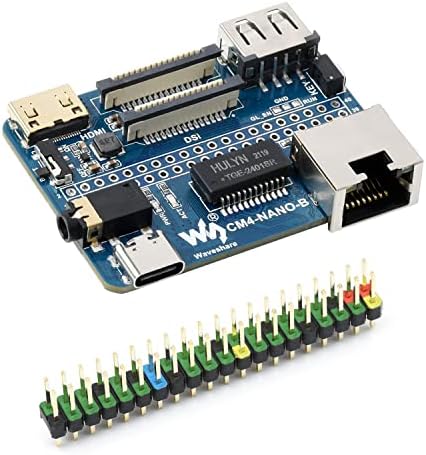
Waveshare Nano Base Board Compatible with Raspberry Pi Compute Module 4
Disponibilidad
En stock
En stock
Peso con empaque
0.20 kg
0.20 kg
Devolución
No
No
Condición
Nuevo
Nuevo
Producto de
Amazon
Amazon
Sobre este producto
- Nano Base Board (B) For Raspberry Pi Compute Module 4, Same Size As The CM4
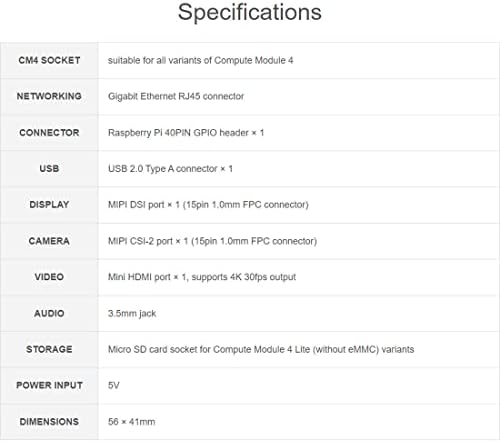
- Standard CM4 Socket, 40PIN GPIO, Gigabit Ethernet, USB2.0, DSI, CSI, 3.5mm Audio Jack...
- All In The Compact Body Just As The Size Of CM4
- Note: the CM4 is NOT included. Please buy it separately if necessary.
- Micro socket for Compute Module 4 Lite (without eMMC) variants
$92,72
55% OFF
$42,15
IMPORT EASILY
By purchasing this product you can deduct VAT with your RUT number
$92,72
55% OFF
$42,15
Envío gratis
Llega en 16 a 26 días hábiles
Con envío
 Tienes garantia de entrega
Este producto viaja
de USA ![]() a tus manos en
a tus manos en
![]()
 a tus manos en


Compra protegida
Disfruta de una experiencia de compra segura y confiable
![]() Garantía de entrega
Garantía de entrega
Con Tiendamia todas tus compras cuentan con Garantía de Entrega o devolución total de tu dinero.
Compras 100% seguras y garantizadas, para que pidas lo que sueñas y lo recibas del mundo a tu puerta.
Tarjetas de Débito y Crédito

Visa

Mastercard

American Express

Dinners

Discover

Alias
Pagos a través de PayPal
Compra procesada en dólares con dinero en cuenta o tarjetas internacionales.

PayPal
Conoce más detalles
PACKAGE CONTENT 1. CM4-NANO-B x1 2. 2*20PIN color-coded straight pinheader x1 Introduction CM4-NANO-B (Raspberry Pi CM4 Ultra Mini Expansion Board Type B) is a baseboard that can be used with Raspberry Pi Compute Module 4. Although it is tiny, it can bring out the interface of Raspberry Pi Compute Module 4. Precautions 1. DO NOT hot-plug any devices except the USB and HDMI. 2. As the module does not have any protection, please do not short-circuit the power supply. 3. The USB Type-C interface can be used as a power supply or as a USB SLAVE interface to program the image. 4. In order to ensure the normal power supply of the CM4, please do not connect other devices when using the USB Type-C interface to program the image. 5. Providing 5V 2A for CM4 to ensure that it is in normal use. Otherwise, there may be problems such as automatic shutdown, frequency reduction and so on. 6. The USB2.0, CSI, DSI and Audio interfaces are disabled by default and need to be enabled by the user. 7. The user key is connected to GPIO21 and pulled up to GPIO_VREF by R16 (10K). When the key is not pressed, GPIO21 is pulled high by default; when the key is pressed, the level of GPIO21 will be pulled down.

