







Raayoo
Floppy Disk Reader 3.5 inch USB Floppy Disk Drive External 3 1/2 Floppy disc Reader Portable Floppy Diskette Drive USB C for PC Laptop Notebook Computer with Windows 11/10 (Frosted Texture, 3.5 inch)
Style:
Frosted Texture


Size:
3.5 inch
Disponibilidad:
En stock
En stock
Peso con empaque:
0.46 kg
0.46 kg
Devolución:
Sí
Sí
Condición
Nuevo
Nuevo
Producto de:
Amazon
Amazon
Sobre este producto
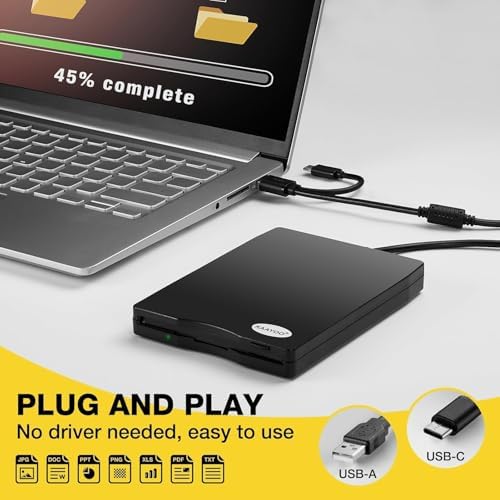
- 【3.5inch External USB Floppy Disk Reader】As most modern laptops and desktop computers no longer come equipped with internal floppy disk drives for reading diskettes, this external USB floppy disk drive is an excellent solution to reading and writing your old floppy disks as easy as a built-in floppy disc reader. Retrieve Your Memories, for all the people that grew up with floppy disks, this is a return to the past
- 【USB Floppy Drive With Modern Brushed Texture】With fashional brushed texture, ultra-slim (Only 0.67inch thick) design and lightweight(Only 0.61Ib), you can easily carry and use this unique 3.5inch external floppy disk drive to retrieve your wonderful memeories, for example, wedding photos, childhood photos, university graduation thesis, favorite songs,etc. at anywhere, no matter in the office, at school, at home, or during travel. It's also a great gift idea for your friends and relatives
- 【3 1/2 Floppy Disk Drive With Wide Compatibility】Compatible with Windows 11/10/8.1/7/XP OS, Not compatible with Mac. In Windows 11/10 systems, there has many hide options in File Explorer, navigate to "Devices and Printers" by following these steps; Windows 11: Start -> Settings -> Bluetooth & devices -> Devices -> "More devices and printer settings" under "Related settings"; Windows 10: Start -> Settings -> Devices -> Bluetooth & Other devices -> "Devices and printer" under "Related settings". Right-Click on the drive icon named "TEACV0.0", hover cursor over "Browse files" and then click on "Floppy disk drive(A:)".
- 【Plug and Play Floppy Disc Reader】No extra driver required, just insert your floppy diskette into USB floppy disk reader, then plug the USB connector to your computer and it will be automatically detected by your computer and install drive right now. Bring up "Windows File Explorer", you will see drive A icon under "Devices and Drives", right click it and select open option, you could cut, paste, copy the files in your floppy disks as you would other files in the system. Easy to USE
- 【Reminder】Not all of your disks can be read. Floppy disks were produced in the 1980s and 1990s and have a history of 30 to 40 years. Due to long storage times, some floppy disks may be corrupted, mouldy or dusty, so some of your floppy disks may not be successfully opened, or the drive may initially be able to open some floppy disks but stop working due to dust on the disks. Therefore, please carefully check the status of the floppy disk before reading them
AR$49,583
44% OFF
AR$27,548
IMPORT EASILY
By purchasing this product you can deduct VAT with your RUT number
AR$49,583
44% OFF
AR$27,548
Llega en 8 a 12 días hábiles
con envío
 Tienes garantía de entrega
Este producto viaja
de USA ![]() a tus manos en
a tus manos en
![]()
 a tus manos en


Compra protegida
Disfruta de una experiencia de compra segura y confiable
Tarjetas de Crédito y Débito

Visa

Mastercard

American Express
Pagos a través de PayPal
Compra procesada en dólares con dinero en cuenta o tarjetas internacionales.

Paypal
Pagos a través de MODO
Compra procesada en pesos desde la App de tu banco.

PayPal

