

















SKU/Artículo: AMZ-B0FMRQFS2Q
AKNES
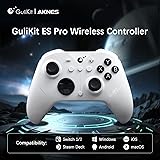
AKNES GuliKit ES PRO Wireless PC Gaming Controller for Switch 1/2, Windows/Android/Mac/Steam Deck with 3.25ms Low Latency, Magnetic TMR Joysticks, Switch1/2 Wake-Up, Tactile Switch D-pad - White
Color:
ES Pro White
Style:
TMR Joystick
Detalles del producto
Disponibilidad:
En stock
En stock
Peso con empaque:
0.29 kg
0.29 kg
Devolución:
Sí
Sí
Condición
Nuevo
Nuevo
Producto de:
Amazon
Amazon
Viaja desde
USA
USA
Sobre este producto
- The World's Fastest Wireless Controller. Support Switch Wakeup. Support Switch2 Wakeup. ES PRO Controller Uses TMR joysticks,4,000-level High Precision. Built-in Smooth Joystick Stand For Ultra-smooth Feel. 256-Level Hall Effect Triggers, High Precision,Long-lasting Durability. Compatible with PC & Android & iOS & macOS / Switch & Switch2 . Tactile Switch D-pad, Sensitive and Accurate.
AR$80.147
49% OFF
AR$41.101
IMPORT EASILY
By purchasing this product you can deduct VAT with your RUT number
AR$80.147
49% OFF
AR$41.101
 Llega en 8 a 12 días hábiles
con envío
 Tienes garantía de entrega
Este producto viaja
de USA ![]() a tus manos en
a tus manos en
![]()
 a tus manos en

Conoce más detalles
Multi-Platform Compatibility - Seamlessly connect to PC Windows, Switch 2/ Switch/Switch Lite/OLED, Android, iOS, Mac, Steam Deck, and ROG Ally. One-key mode switching simplifies cross-device gaming. Ultra-Low Latency & High Responsiveness - Experience competitive-grade performance with GuliKit Hyperlink 2 wireless technology, achieving 3.25ms latency at 730Hz polling (Bluetooth) and 1.87ms in wired mode (1000Hz). Ideal for esports and precision gaming. Advanced TMR Joysticks & Hall Triggers - Equipped with precision TMR (Tunnel Magnetoresistance) magnetic joysticks for Long-lasting Durability control, plus 256-level Hall Effect triggers for lifelike analog input. Extended 30-Hour Battery & Auto-Sleep - 950mAh rechargeable battery delivers 30 hours of gameplay. Features auto-sleep after 15 minutes of inactivity for power efficiency. Custom Controls & Switch 1/2 Wake-Up Support - Adjustable joystick sensitivity, vibration, turbo, and gyro aiming, setting via controller or web tool. Supports wake-up for Switch 1/2 (*Special pairing required for Switch 2 wake-up - see video guide. Firmware update essential.*). Switch 1/2 Wake-Up - Ensure you update to the latest firmware available on GuliKit website. A. Set the controller to NS mode, turn it on, hold the pairing button for 2 seconds, and the indicator will flash rapidly to initiate pairing. B. First put Switch 2 into sleep mode (black screen). Press the HOME button on the Joy-Con to wake the screen, then enter the controller pairing interface and complete pairing. Trusted by AKNES – Enjoy reliable customer support. Contact us anytime for assistance—we’re here to help! Visit our store for more details.
Compra protegida
Disfruta de una experiencia de compra segura y confiable
Tarjetas de Crédito y Débito

Visa

Mastercard

American Express
Pagos a través de PayPal
Compra procesada en dólares con dinero en cuenta o tarjetas internacionales.

Paypal
Pagos a través de MODO
Compra procesada en pesos desde la App de tu banco.

PayPal

