









SKU/Artículo: AMZ-B0F86M3CYD
Ardaddyn
Memory Stick Pro Duo Adapter - 4 in 1 SD/TF/MS/XD Card Reader for iPhone 16/15/14/iPad/PC/Android/MAC, Lightning/USB-C/USB-A Multi Memory Card Reader Digital Camera Adapter for Sony Cybershot SD Card
Color:
4 in 1 SD/TF/XD/MS Card Reader
Detalles del producto
Disponibilidad:
En stock
En stock
Peso con empaque:
0.15 kg
0.15 kg
Devolución:
Sí
Sí
Condición
Nuevo
Nuevo
Producto de:
Amazon
Amazon
Viaja desde
USA
USA
Sobre este producto
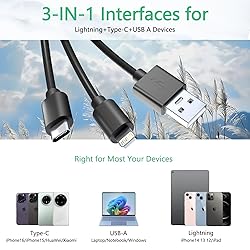
- 4 in 1 SD/TF/XD/MS Card Reader Lightning+USB C+USB A Ports 3 in 1 Port DesignUSB C port supports iPhone 16, iPhone 15, Samsung Galaxy, Huawei, tablet, laptop, Macbook and so on. Lightning port supports iPhone 14/14 Plus/13/13 Pro/13 Pro Max/13mini/12/12 Mini/11 Pro/11 Pro Max/ XS Max/ XS and so on.USB A port supports PC and so on.Multi Memory Card Compatibility:SD card: SDXC / SDHC / SD / MMC (mini SD / Mini SDHC / RS-MMC Micro SD (TF) Slot: Micro SDXC / Micro SDHC / Micro SD MS: MS Pro / Memory Stick Duo / Memory Stick Pro Duo / Memory Stick Pro DuoXD: Olympus XD PictureNote: Reading two cards at the same time is not supported.High-Speed TransmissionThe SD card reader supports data transfer speeds of up to 480Mbps, significantly improving work efficiency. Note: Actual speed varies by device.Supports card capacity up to 2TB, the 15cm cable provides enough space to connect different devices without obstruction.Plug and PlayThe 4 in 1 card reader plug and play, eliminates the need for additional drivers, providing a seamless user experience. OS How to store from phone to memory card?Insert the memory card into the card readerThen insert the caard reader into the iPhone find the "photos" appSelect the picture or video you want to save to the memory cardClick on "save to files"Find the card reader file and select Save File to complete the operation.(generally data of memory card is on “Untiled” or "NONAME", which is the name of your memory card)OS How to store from memory card to phone?Insert the memory card into the card readerThen insert tthe card reader into the iPhoneFind the "files" app, Click"Untitled"Selsct the photo or video you want to import into your iPhhoneSelect "Save Items" to complete the ooperationQAQ: Which iOS and Android versions are supported by the SD/TF/XD card reader?A: The SD/TF/XD card reader supports iOS devices running iOS 9.1 and above, as well as OTG-enabled Android smartphones/computers. However, for iOS 9.2 to iOS 12.4, only one-way import of photos and videos to Apple devices and the use of USB keyboards are supported. Word, Excel, PowerPoint, PDF reading, and USB mouse operation are not supported. Full functionality is available for iOS 13 and above.Q: Why can’t it be used on my iPad pro/air?A: Your external storage device must be formatted using APFS or exFAT. Encrypted drives are not supported, nor are NTFS formats. All smartphones cannot recognize NTFS format and only support FAT32 format. Please back up the files on the SD card and format the SD card to FAT32 format.Q: Why is my Android phone not recognizing the card reader after I plug it in?A: This is a known limitation of the Android system. Due to the way Android handles external devices, the system only scans external storage once—when the device is first connected.If you plug in the card reader before inserting the memory card (SD, TF, or XD), your Android device may not detect the card.To ensure proper operation on Android devices (using the Type-C connector):Insert the memory card first into the reader.Then connect the card reader to your Android phone or tablet.If you want to change the card, unplug the card reader, insert the new card, and then reconnect it to your device.This ensures your device performs a fresh scan and detects the new card properly.This behavior is specific to Android devices. iPhones (Lightning connector) and computers (USB-A or Type-C ports) do not require this step. On those devices, you can insert or remove cards freely while the card reader is connected.
AR$70.279
60% OFF
AR$28.108
IMPORT EASILY
By purchasing this product you can deduct VAT with your RUT number
AR$70.279
60% OFF
AR$28.108
 Llega en 8 a 12 días hábiles
con envío
 Tienes garantía de entrega
Este producto viaja
de USA ![]() a tus manos en
a tus manos en
![]()
 a tus manos en

Conoce más detalles
Multi-Card Reader: The memory stick duo adapter is equipped with SD / Micro SD (TF) / MS / XD four card slots, supporting memory card reading needs from various devices such as cameras, drones, dashcams, and surveillance equipment. It is compatible with Memory Stick Pro Duo, Memory Stick Duo, Olympus xD-Picture Card, SD/SDHC/SDXC, and microSD, etc. Whether it's photos, videos, or documents, you can easily read and transfer data, helping you manage your files efficiently. 3-in-1 Interface: The memory stick adapter features Lightning, USB-C, and USB-A interfaces, allowing for plug-and-play use without the need for any drivers. It is compatible with a wide range of devices including iPhone / iPad / MacBook / Android phones / Windows computers, meeting the needs of multi-platform users. It’s an ideal companion for photography enthusiasts and business professionals. High-Speed Transmission: The SD card reader supports data transfer speeds of up to 480Mbps, allowing a 1GB file to be transferred in just a few seconds, significantly improving work efficiency. Easily import HD videos and RAW images with fast and stable performance — no lag, no delay. Note: Actual speed varies by device. Aluminum Alloy Casing: The SD memory card reader features an aviation-grade aluminum alloy shell, offering excellent heat dissipation and compression resistance to effectively protect internal components and extend product lifespan. With a sleek and minimalist appearance and a comfortable grip, it combines aesthetics and functionality, making it a stylish accessory for your digital devices. Compact and Portable: The 4 in 1 card reader is designed with a compact form factor, small enough to easily fit in your pocket, camera bag, or laptop case. It enables you to read or back up data anytime, anywhere — whether you're shooting outdoors, on a business trip, or working in the office, it’s your go-to portable data companion. Kind tips: Please make sure the memory card is correctly inserted into the card reader. If photos or videos cannot be transferred, unplug the card reader and memory card and reconnect them. (When some Android phones are plugged in for the first time, a format mismatch prompt may pop up and the U disk needs to be formatted. It can be used normally after formatting, and there is no need to perform this operation again in the future.)
Compra protegida
Disfruta de una experiencia de compra segura y confiable
Tarjetas de Crédito y Débito

Visa

Mastercard

American Express
Pagos a través de PayPal
Compra procesada en dólares con dinero en cuenta o tarjetas internacionales.

Paypal
Pagos a través de MODO
Compra procesada en pesos desde la App de tu banco.

PayPal

