









SKU/Artículo: AMZ-B0DGT8NKDR
Arsandyn
Surface Pen - Surface Pro Pen Stylus for Surface Pro 11/9/10/8/X/7/6/5/4/3, USB-C Fast Charge, Draw or Write Like on Paper, Surface Pro 11 Copilot Pen for Surface Go 2/3/4/Book/Laptop/Studio
Color:
Black
Detalles del producto
Disponibilidad:
En stock
En stock
Peso con empaque:
0.15 kg
0.15 kg
Devolución:
Sí
Sí
Condición
Nuevo
Nuevo
Producto de:
Amazon
Amazon
Viaja desde
USA
USA
Sobre este producto
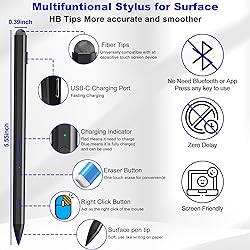
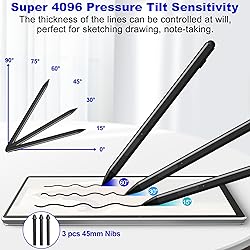
- Stylus for Surface - Stylus Pro Pen Stylus for Surface Pro 11/9/10/8/X/7/6/5/4/3,Fast Charge & Draw or Write Like on Paper, Surface Pro 11 Copilot Pen for Surface Go 2/3/4/Book/Laptop/Studio Compatibility & Premium Service - The surface pro 11 stylus pen is compatible with Surface Pro 9/10/11/8/X/7/7plus/6/5/4/3, Surface Laptop / Laptop 2 / Laptop 3 / Laptop 4/Laptop 5, Surface Book / Book 2 / Book 3, Surface GO/Surface GO 2,/Surface GO 3/GO 4, Surface Studio/Surface Studio 2. It is also compatible with ASUS/HP/Sony/Dell series. If you have any questions, you can ask us, 24-hour online service Dual-Touch Design - The surface pro 11 pencil has a two-in-one touch design. One end of the surface pro pencil tip uses traditional handwriting input to simulate the feeling of real pen strokes, allowing users to write and draw more freely, while the other end of the surface pen uses capacitive touch technology, which can achieve operations similar to sliding and clicking on the smartphone screen. User-Friendly Experience - Surface pro 9 stylus pen just simply press any button to start writing, no Bluetooth or APP drivers required, easy to use! Equipped with two multi-functional buttons: eraser button (long-press to erase errors), right-click (one-click function, also equivalent to the right mouse button). In addition, the windows surface stylus is equipped with two powerful magnets that can be attached to the tablet, portable and not easy to lose. Write or Draw Like on Paper - Surface Go 2 Pen features 4096 levels of pressure sensitivity, the pen can recognize the pressure and tilt angle of the pen, and draw lines of different thicknesses (the greater the pressure, the thicker the line). In addition, the 45mm pen tip simulates the feeling of real pen strokes, allowing you to accurately outline, shade and color on the screen. Smooth and natural, no delay, no lag! Anti Palm Touch Technology - Stylus for Surface Pro have anti palm touch technology. When drawing or handwriting, your hand can be naturally supported on the tablet screen without worrying about unintentional touching of the screen by your hand, resulting in interruption of text or drawing input. It's as easy and natural as drawing and writing on paper! Very free flowing. USB-C 30-Minute Fast Charging - The pen for surface pro uses a usb-c fast charging design, which can be used for up to 60 hours after charging for 30 minutes. In addition, the surface pro pen can automatically sleep after 10 minutes of inactivity. This greatly reduces battery consumption and extends the life of the Surface stylus. window surface pro pen surface pro pen magnetic surface pro pen usb c surface pro stylus pen rechargeable stylus for surface pro surface pro pen stylus surface pro stylus pen for surface pro pencil for surface pro pencil for surface pro surface pro pencil surface pro pen surface pro stylus stylus for surface pro pen for surface pro surface pro stylus with eraser surface pro pen 4096 surface pro copilot pen pen for surface windows surface stylus pen stylus for surface surface studio stylus surface go stylus pen surface go pencil stylus for surface go pen for surface go surface pro 11 stylus surface pro 11 pencil surface pro 2024 pen surface pro copilot pen surface pen 2024 windows surface pro 11 pen surface copilot pen surface pro 9 stylus surface pro 9 pencil pen for surface pro 9 stylus for surface pro 9 surface pro 9 pen stylus eraser surface pro 9 surface pro 8 stylus surface pro 8 stylus pen surface pro 8 stylus windows surface pro 8 pen window surface pro 7 pen windows surface pro 7 stylus surface pro 7 stylus surface pro 7 pen surface pro 7 pencil surface pro 6 stylus pen surface pro 6 stylus surface pro 6 pencil surface pro 5 pen surface pro 5 stylus pen for surface pro 5 stylus for surface pro 5 surface pro 4 pen stylus surface pro 4 pencil surface pro 4 pen surface surface go 3 pencil surface book 3 stylus surface book 3 pen surface book 2 pen surface book 2 stylus surface studio 2 stylus surface studio 2 pen surface laptop 5 stylus surface laptop 5 pen surface laptop 4 stylus
AR$92.614
49% OFF
AR$47.499
IMPORT EASILY
By purchasing this product you can deduct VAT with your RUT number
AR$92.614
49% OFF
AR$47.499
 Llega en 8 a 12 días hábiles
con envío
 Tienes garantía de entrega
Este producto viaja
de USA ![]() a tus manos en
a tus manos en
![]()
 a tus manos en

Conoce más detalles
Compatibility & Premium Service - The surface pro 11 stylus pen is compatible with Surface Pro 9/10/11/8/X/7/7plus/6/5/4/3, Surface Laptop / Laptop 2 / Laptop 3 / Laptop 4/Laptop 5, Surface Book / Book 2 / Book 3, Surface GO 1/Surface GO 2,/Surface GO 3/GO 4, Surface Studio/Surface Studio 2. It is also compatible with ASUS/HP/Sony/Dell series. If you have any questions, you can ask us, 24-hour online service User-Friendly Experience - Surface pro 9 stylus pen just simply press any button to start writing, no Bluetooth or APP drivers required, easy to use! Equipped with two multi-functional buttons: eraser button (long-press to erase errors), right-click (one-click function, also equivalent to the right mouse button). In addition, the windows surface stylus is equipped with two powerful magnets that can be attached to the tablet, portable and not easy to lose. Write or Draw Like on Paper - Surface Go 2 Pen features 4096 levels of pressure sensitivity, the pen can recognize the pressure and tilt angle of the pen, and draw lines of different thicknesses (the greater the pressure, the thicker the line). In addition, the 45mm pen tip simulates the feeling of real pen strokes, allowing you to accurately outline, shade and color on the screen. Smooth and natural, no delay, no lag! Anti Palm Touch Technology - Stylus for Surface Pro have anti palm touch technology. When drawing or handwriting, your hand can be naturally supported on the tablet screen without worrying about unintentional touching of the screen by your hand, resulting in interruption of text or drawing input. It's as easy and natural as drawing and writing on paper! Very free flowing. Dual-Touch Design - The Surface pro 11 pencil has a two-in-one touch design. One end of the surface pro pencil tip uses traditional handwriting input to simulate the feeling of real pen strokes, allowing users to write and draw more freely, while the other end of the surface pen uses capacitive touch technology, which can achieve operations similar to sliding and clicking on the smartphone screen. USB-C 30-Minute Fast Charging - The pen for surface pro uses a usb-c fast charging design, which can be used for up to 60 hours after charging for 30 minutes. In addition, the surface pro pen can automatically sleep after 10 minutes of inactivity. This greatly reduces battery consumption and extends the life of the Surface stylus.
Compra protegida
Disfruta de una experiencia de compra segura y confiable
Tarjetas de Crédito y Débito

Visa

Mastercard

American Express
Pagos a través de PayPal
Compra procesada en dólares con dinero en cuenta o tarjetas internacionales.

Paypal
Pagos a través de MODO
Compra procesada en pesos desde la App de tu banco.

PayPal

