












SKU/Artículo: AMZ-B0CW696VWY
Ardaddyn
SD Card Reader Memory Stick pro Duo Adapter - 5 in 1 SD/TF/CF/MS/XD Card Reader for iPhone Supports Micro SD/SDHC/Compact Flash/XD Picture Cards, Lightning+USB A+USB C Memory Stick Pro Adapter
Color:
5 in 1 SD/TF/XD/MS/CF Card Reader
Detalles del producto
Disponibilidad:
En stock
En stock
Peso con empaque:
0.15 kg
0.15 kg
Devolución:
Sí
Sí
Condición
Nuevo
Nuevo
Producto de:
Amazon
Amazon
Viaja desde
USA
USA
Sobre este producto
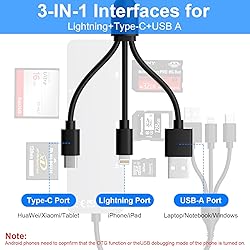
- 5 in 1 Multi Card Reader Lightning+USB C+USB A Ports 3 in 1 Port DesignUSB C port supports iPhone 15, Samsung Galaxy, Huawei, tablet, laptop, Macbook and so on. Lightning port supports iPhone 14/14 Plus/13/13 Pro/13 Pro Max/13mini/12/12 Mini/11 Pro/11 Pro Max/ XS Max/ XS and so on.USB A port supports PC and so on. Multi Card ReaderComes with CF/SD/TF/XD/MS five card slots.Supports a wide range of card types such as SDXC, SDHC, SD, CF, MS, Micro SDXC, and Micro SDHC. This design eliminates the need for separate card readers for each card format, thus saving space.Note: Reading two cards at the same time is not supported. Transfers Data Quickly and is Easy to Carry480Mbps transfer speed, it swiftly moves your data, saving you time and improving productivity. Made of aluminum material, which has good heat dissipation and long service life.Compact design makes it easy to carry and use.Whether on the go or process data at the office, you can easily put it in your pocket or take it with you. Perfect for photographers, studios, and one dealing with large files. Plug and PlayThe micro sd card reader plug and play, eliminates the need for additional drivers, providing a seamless user experience. OS How to store from phone to memory card?Insert the memory card into the card readerThen insert the caard reader into the iPhone find the "photos" appSelect the picture or video you want to save to the memory cardClick on "save to files"Find the card reader file and select Save File to complete the operation.(generally data of memory card is on “Untiled” or "NONAME", which is the name of your memory card)OS How to store from memory card to phone?Insert the memory card into the card readerThen insert tthe card reader into the iPhoneFind the "files" app, Click"Untitled"Selsct the photo or video you want to import into your iPhhoneSelect "Save Items" to complete the ooperation Kind tips:Please make sure the memory card is correctly inserted into the card reader.If photos or videos cannot be transferred, unplug the card reader and memory card and reconnect them.(When some Android phones are plugged in for the first time, a format mismatch prompt may pop up and the U disk needs to be formatted. It can be used normally after formatting, and there is no need to perform this operation again in the future.)
AR$60.904
49% OFF
AR$31.233
IMPORT EASILY
By purchasing this product you can deduct VAT with your RUT number
AR$60.904
49% OFF
AR$31.233
 Llega en 8 a 12 días hábiles
con envío
 Tienes garantía de entrega
Este producto viaja
de USA ![]() a tus manos en
a tus manos en
![]()
 a tus manos en

Conoce más detalles
Lightning+USB C+USB A Ports 3 in 1: This memory stick pro duo reader adopts three interface design and is compatible with various devices and operating systems. Whether your use i-Phone/i-Pad PC or other USB C phone device, you can easily connect and use this card reader Multi Card Reader: The multi-card reader comes with CF/SD/TF/XD/MS five card slots. It supports a wide range of card types such as SDXC, SDHC, SD, CF, MS, Micro SDXC, and Micro SDHC cards 480Mbps Fast Transmission: Supercharge your file transfers with our XD card reader. Boasting a lightning-fast 480Mbps transfer speed, it swiftly moves your data, saving you time and improving productivity. Perfect for photographers, studios, and one dealing with large files Plug and Play: The micro sd card reader plug and play, eliminates the need for additional drivers, providing a seamless user experience. Simply connect it and start transferring data effortlessly Slim and Compact Design: The ms card reader is made of aluminum material, which has good heat dissipation and long service life, and its compact design makes it easy to carry and use. Whether you need to transfer photos on the go or process data at the office, you can easily put it in your pocket or take it with you
Compra protegida
Disfruta de una experiencia de compra segura y confiable
Tarjetas de Crédito y Débito

Visa

Mastercard

American Express
Pagos a través de PayPal
Compra procesada en dólares con dinero en cuenta o tarjetas internacionales.

Paypal
Pagos a través de MODO
Compra procesada en pesos desde la App de tu banco.

PayPal

