












SKU/Artículo: AMZ-B09PRCZX49
XENCELABS
XENCELABS Drawing Tablet Bundle, Computer Graphic Tablets with 40 Customizable Quick Keys, 12" 8mm Ultrathin Pen Tablet with 2 Battery-Free Stylus, 8192 Levels Pressure for Win/Mac/Linux, Black
Size:
Detalles del producto
Disponibilidad:
Fuera de stock
Fuera de stock
Peso con empaque:
0.85 kg
0.85 kg
Devolución:
Sí
Sí
Condición
Nuevo
Nuevo
Producto de:
Amazon
Amazon
Viaja desde
USA
USA
Sobre este producto
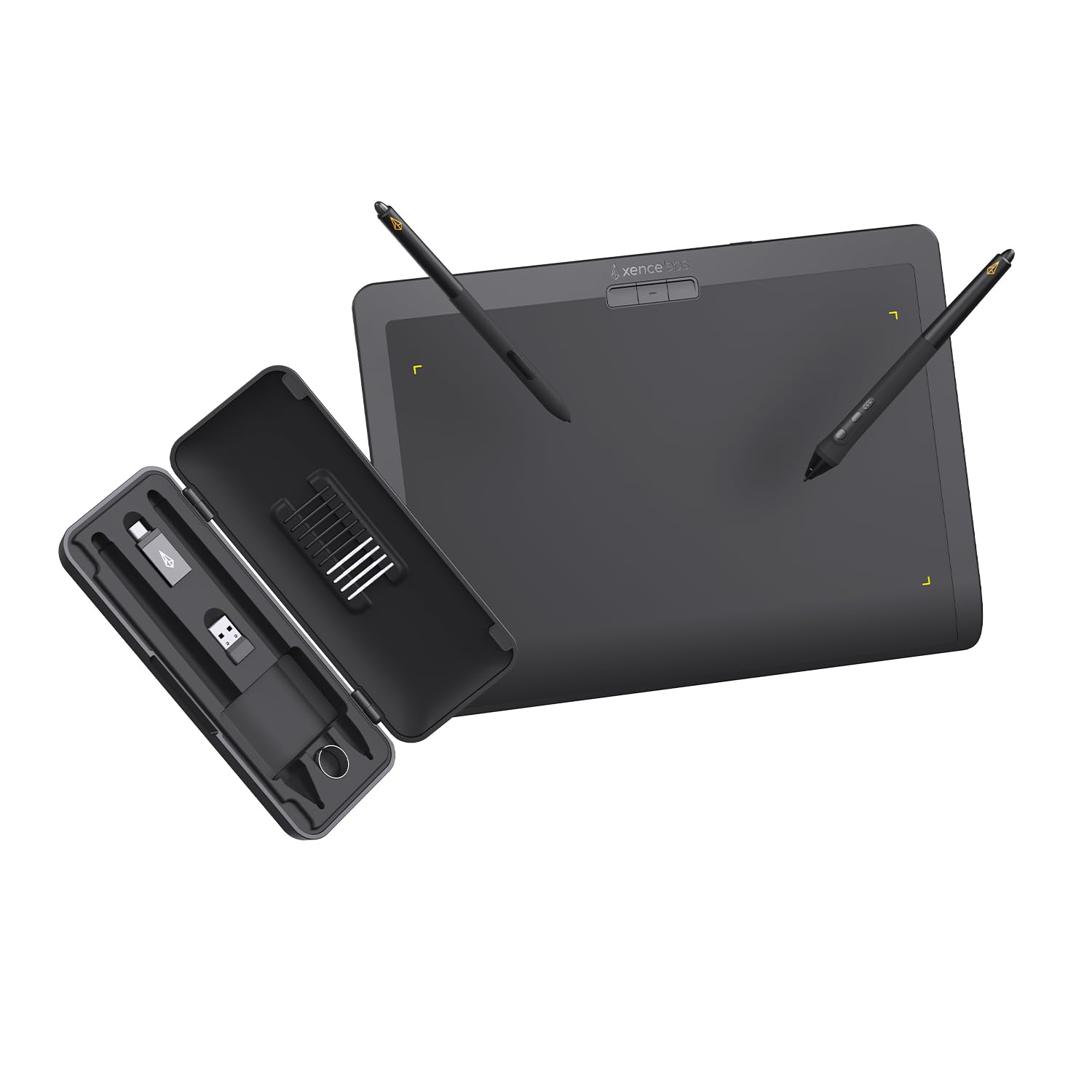
- Xencelabs Quick Keys Included Xencelabs Pen Tablet Bundle, with our innovative Xencelabs Quick Keys, is a combination designed with productivity in mind. More Productivity Short-cuts are the key to productivity and streamlining workflow. The Xencelabs Quick Keys enables artists to incorporate shortcut keys into their regular workflow through an easy-to-use interface. The OLED display and physical dial allow you to create up to 40 shortcuts per application and group sets of related functions like sketching, coloring, and editing. Artists who previously found shortcut keys slightly cumbersome to use can now benefit from a powerful efficiency booster.The Right Amount of “Tooth” We were intentional designing the surface texture of the tablet, paying close attention to finding the right amount of friction or, “tooth”. It was paramount that the finish made drawing on the surface feel as natural and familiar as possible.Adaptable to your Drawing Preferences Driver panels can be complex and intimidating to use. As a result, many artists buy a pen tablet and never change any of the settings. Our driver is a modern design built from the ground up to be easy and intuitive to use. You can quickly access the settings from via buttons at the top of the tablet. Our driver settings panel also make it easy to customize the included Xencelabs Quick Keys. You can change and rename sets, keys, device orientation, assign functions for the dial, and change the color of the ring LED.

Fuera de stock
Selecciona otra opción o busca otro producto.
Este producto viaja
de USA ![]() a tus manos en
a tus manos en
![]()
 a tus manos en

Conoce más detalles
Best In Class Drawing Performance:The inclusion of a 3G initial activation force and studio-grade levels of pressure sensitivity ensures a smooth and uniform variation in stroke thickness, resulting in a delicate and refined drawing experience no matter how light or heavy your touch.Besides,thoughtfully selected materials on the pen tablet surface give creatives the right amount of friction, delivering fluid, accurate pen strokes that feel like drawing on traditional pen and paper. Professional Drawing Tablet: Our Pen Tablet was co-designed with the input of industry leading creatives. The active area (10.3”x5.75”) has true 16:9 aspect ratio to match industry standard displays. A minimal design that prioritizes comfort and functionality with features for faster workflows, and a great drawing experience. Curved Gentle Slope: The Xencelabs Pen Tablet is designed with a curved slope, which reduces potential tension and stress to create a comfortable, natural drawing experience. Its front edge is narrowed to only 5 mm thin and features a curved slope to form a seamless palm rest. Two Battery-free Pens: Two different sized pens come standard with our drawing tablet, both fully customizable to your workflow. The wider barreled, 3 Button Pen has three programmable buttons + eraser to transform this pen into your fully customized tool. The smaller barreled, Thin Pen handles like your favorite pen or pencil and has two assignable buttons + eraser. 8192 levels of pressure sensitivity, 5080LPI pen resolution, tilt recognition, and virtually no lag. Quick Keys: Working in unison with the pen tablet, the shortcut keys gives you 5 sets of 8 keys – a total of 40 programmable functions per application. Includes a physical dial with 4 settings that perform two functions. There is also an OLED display that shows you each key assignment at a glance. This enables you to make logical key groupings for specific steps in the workflow. Easy Installation and User Interface: You can quickly access the settings from the buttons at the top of the pen tablet. The driver settings also make it easy to customize the included Quick Keys. You can easily change, rename sets, keys and device orientation as you need.
Compra protegida
Disfruta de una experiencia de compra segura y confiable
Tarjetas de Crédito y Débito

Visa

Mastercard

American Express
Pagos a través de PayPal
Compra procesada en dólares con dinero en cuenta o tarjetas internacionales.

Paypal
Pagos a través de MODO
Compra procesada en pesos desde la App de tu banco.

PayPal

 Tienes garantía de entrega