












SKU/Artículo: AMZ-B09PNCP43J
Doohoeek
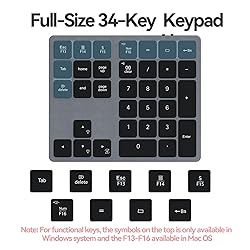
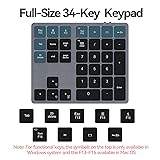
Doohoeek Backlit Bluetooth Numeric Keypad for Laptops and Computers, Number Pads 34 Keys with 7-Color Backlight for MacBook & Windows, Gray
Size:
Bluetooth Only
Color:
Space Grey
Detalles del producto
Disponibilidad:
En stock
En stock
Peso con empaque:
0.27 kg
0.27 kg
Devolución:
Sí
Sí
Condición
Nuevo
Nuevo
Producto de:
Amazon
Amazon
Viaja desde
USA
USA
Sobre este producto
- Doohoeek Backlit Buetooth Keypad Windows and Macbook, Gray How to adjust the backlit keys: 1. Adjust keys backlighting down or up by pressing “Esc” key + “Up” or “Down” arrow key; 2. Change backlighting colors by pressing “Esc” key + “right” arrow key. How to connect to the keyboard: 1. Fully charge the keyboard; 2. Turn on the keyboard; 3. Press the “CONNECT” button to enter the Bluetooth pairing mode; 4. Turn on the Bluetooth of your laptop and click Bluetooth named “bluetooth keyboard” to connect it. How to configure the keyboard for different operating system: 1. Please press and hold “Esc” and then press “Enter” key for 5 seconds; 2. If the keyboard is under Windows configuration, the LED1 will turn blue. If the keyboard is under configuration, the LED1 will turn red. The bluetooth dosen’t show up on my device: 1. Please go to Bluetooth page to “delete” or “forgot” all devices connected your tablet before; 2. Reconnect the keyboard according to the steps above.
AR$81.068
44% OFF
AR$45.035
IMPORT EASILY
By purchasing this product you can deduct VAT with your RUT number
AR$81.068
44% OFF
AR$45.035
 Llega en 8 a 12 días hábiles
con envío
 Tienes garantía de entrega
Este producto viaja
de USA ![]() a tus manos en
a tus manos en
![]()
 a tus manos en

Conoce más detalles
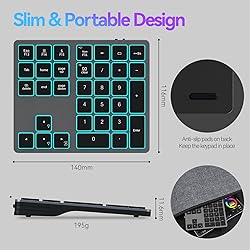
Familiar Number Configuration for Efficiency: Forget hunting through a full row of numbers on no numpad keyboards. This keypad is a must-have for those who needs intense data input but is not used to typing with that kind of keyboards. Portable and Sturdy: Type wherever you like thanks to the slim and portable design (195g weight; 143mm*118mm*14mm). It also built with the high quality of ABS material that keeps it from falling and scratching. Backlit Keys for Any Lighting Environment: The keyboard with 7 colors and 3 levels of brightness allow you to type day or night. The backlit shortcut keys (“Esc” + the arrow keys) allow you to manually adjust the color and brightness of the keys. Reliable 5.0 Bluetooth Connection: The strong and secure Bluetooth connection allows you to work efficiently with a 10m range. You only need to press “CONNECT” button to enter Bluetooth pairing mode. Long Lasting Rechargeable Battery: It can work up to 220 hours without backlighting thanks to auto-sleep power saving mode and an/off switch button. Note: The battery life may vary based on use and computing conditions. Wide Compatibility: The keypad is compatible with both Windows and mackbook devices. Please configure the keypad to the corresponding operating system after paring it.
Compra protegida
Disfruta de una experiencia de compra segura y confiable
Tarjetas de Crédito y Débito

Visa

Mastercard

American Express
Pagos a través de PayPal
Compra procesada en dólares con dinero en cuenta o tarjetas internacionales.

Paypal
Pagos a través de MODO
Compra procesada en pesos desde la App de tu banco.

PayPal

