






 Garantía de entrega


Artículo: AMZ-B0FQJ5GN2L
v AV Access
AV Access Docking Station KVM Switch 1 Laptop & 2 Desktop PCs, Dual 4K@60Hz Monitors, EDID Emulation, 100W USB-C Charging, Gigabit Ethernet,High Refresh Rates,Ideal for Gaming, Office & Creative Work
Detalles del producto
Disponibilidad
En stock
En stock
Peso con empaque
0.99 kg
0.99 kg
Devolución
Sí
Sí
Condición
Nuevo
Nuevo
Producto de
Amazon
Amazon
Viaja desde
USA
USA
Sobre este producto
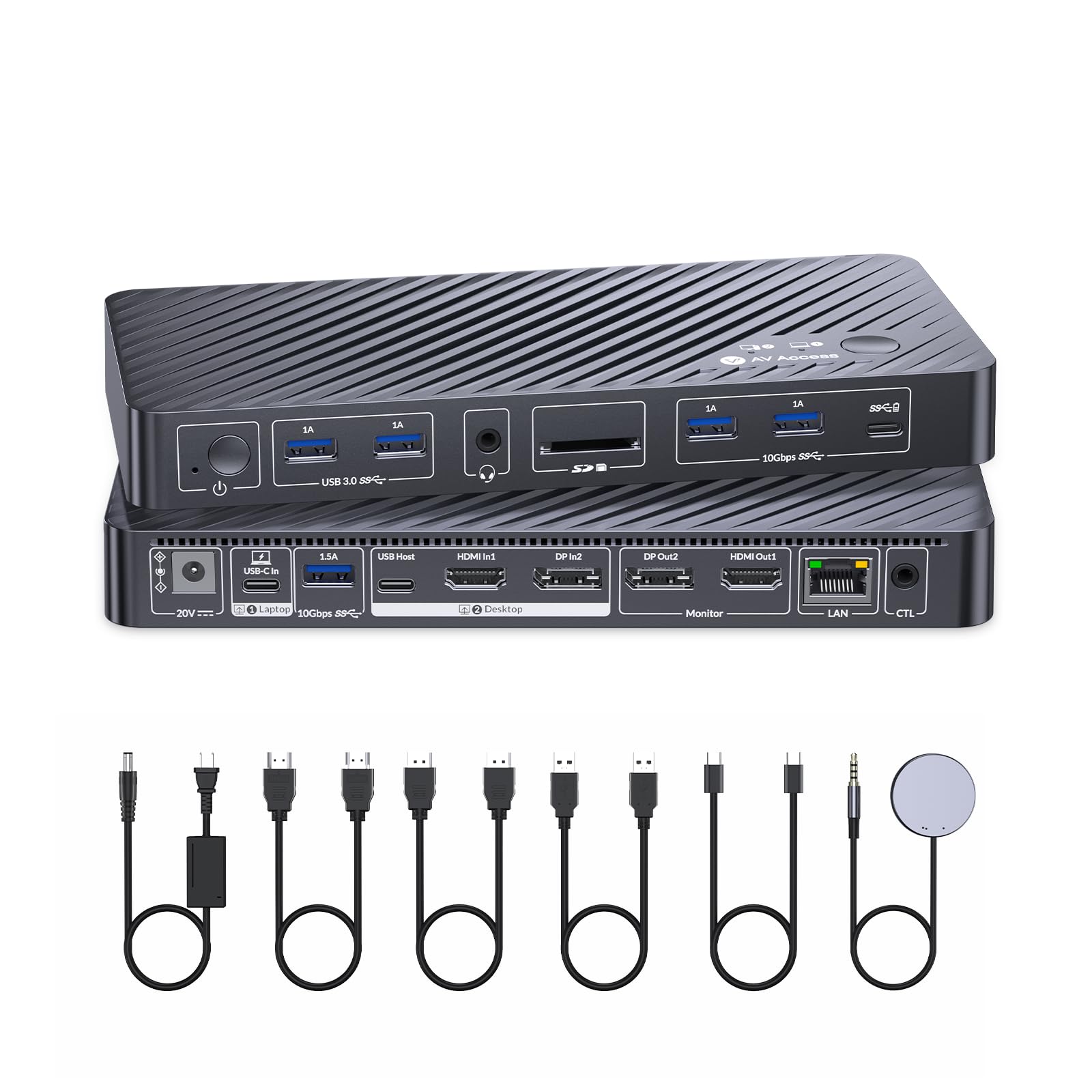
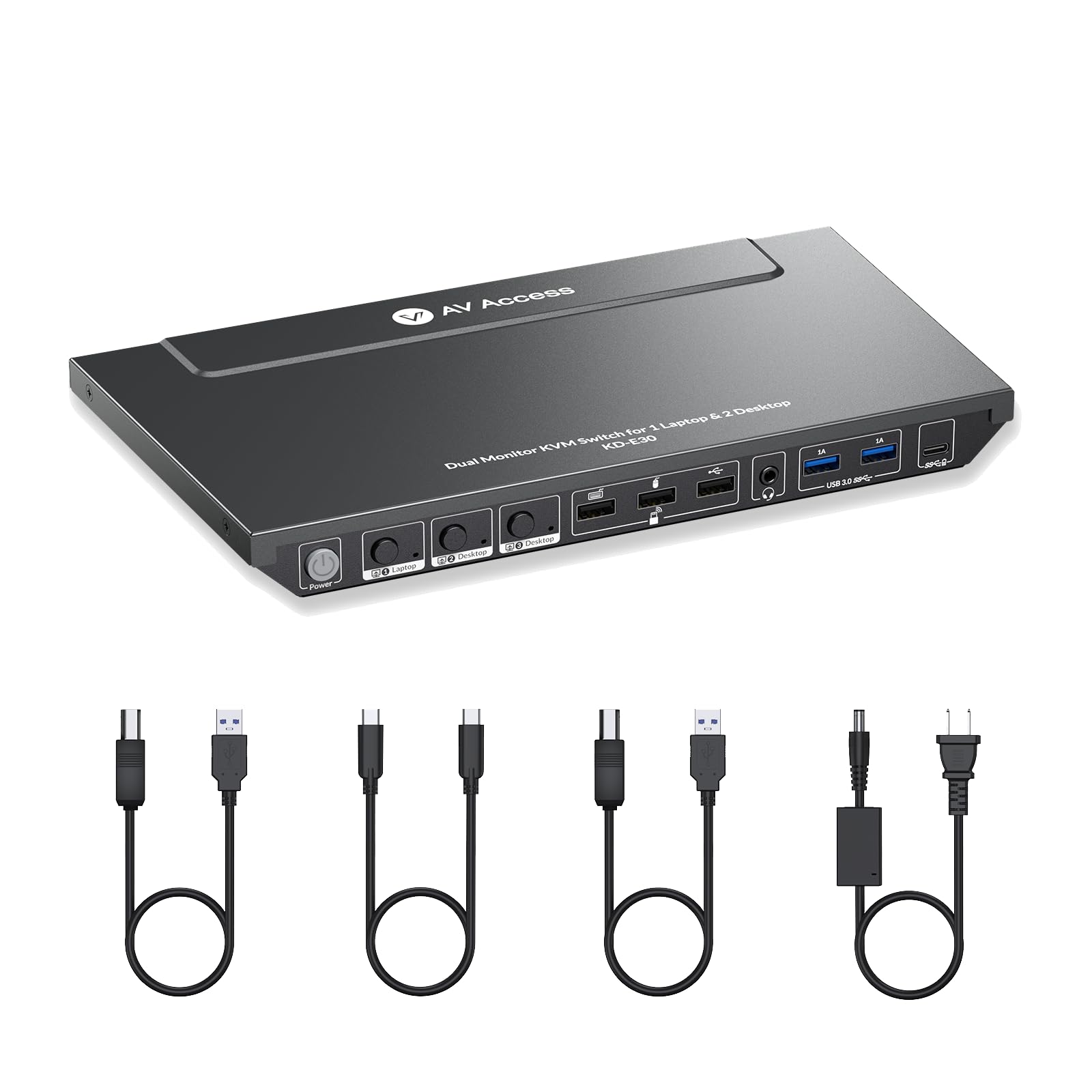
- If you work with multiple computers on the same desk and constantly switch between them—such as a USB-C work laptop and two desktop PCs for gaming, creation, or testing—this KVM docking station is built for that exact workflow. It allows all three computers to share two monitors, one keyboard, one mouse, and the same peripherals, so you don’t have to unplug cables, reconnect displays, or reset your setup every time you change devices. With a single button press, your entire dual-monitor workspace moves from one computer to another, making it especially useful for hybrid professionals, creators, developers, and gamers who switch systems many times a day. This setup is ideal if you care about smooth visuals and fast response, not just basic switching. Whether you’re gaming on a desktop, editing video, or working in design software, it maintains high-quality output without visual interruptions when switching computers. You won’t experience common KVM frustrations like black screens, resolution changes, or windows rearranging, which makes it reliable for color-sensitive work and high-refresh-rate gaming. Everything connected to your desk—network, storage, audio devices, and input peripherals—stays available as you move between systems, so online meetings, file transfers, and gameplay continue without disruption. If your laptop is your main work machine, this device also functions as a full docking solution, keeping it charged, connected to wired internet, and integrated into your dual-monitor setup through a single USB-C connection. It’s best suited for users who want one clean, shared workstation for three computers, need driver-free compatibility, and value fast, predictable switching. Please note that macOS does not support USB-C MST, so dual monitors will show mirrored content on Mac, while compatible Windows systems can extend across both displays.
$673,99
60% OFF
$269,60
IMPORT EASILY
By purchasing this product you can deduct VAT with your RUT number
$673,99
60% OFF
$269,60
Envío gratis
 Llega en 5 a 12 días hábiles
Con envío
 Tienes garantia de entrega
Este producto viaja
de USA ![]() a tus manos en
a tus manos en
![]()
 a tus manos en

Conoce más detalles
Important Notes: Mac Os doesn’t support USB-C MST (multi-stream transport), so two duplicate contents will be displayed. 【Triple-Computer, Dual-Monitor Productivity】Connect one USB-C laptop and two desktop PCs (HDMI + USB-B) to dual monitors with a single set of keyboard and mouse. Switch between devices easily with the top button for efficient multitasking in work, creation, or gaming. 【4K Ultra HD & High Refresh Rates】Supports 4K@60Hz, 1440p@144Hz, and 1080p@240Hz/165Hz. Enjoy crisp visuals, smooth motion, and responsive performance for gaming, design, and video editing. 【EDID Emulation for Reliable Displays】Keeps monitor settings consistent when switching devices, preventing black screens, resolution resets, and window re-arrangement issues. 【All-in-One 10-Port USB-C Docking Station】Expand your workstation with USB 3.0, USB-C, USB 2.0, SDXC card slot, 3.5mm headset jack, and more. Connect all your peripherals in one convenient hub. 【Full-Speed 100W USB-C Charging】Equipped with a full-featured USB-C port, the KD-E30 can provide up to 100W power delivery to your laptop, keeping it charged while you work with dual monitors and multiple peripherals. Note: When charging your laptop, please additionally use your laptop’s original adapter. 【Fast Gigabit Ethernet for Laptop】Provides a stable 1G wired network connection to your laptop. Ideal for remote work, online meetings, and large file transfers. 【Automatic Wake-Up & Energy-Saving Control】Automatically wakes up connected computers when switching devices, ensuring seamless operation without manual restart. The single power button lets you easily turn the KVM on or off, saving energy and keeping your workspace efficient.
Compra protegida
Disfruta de una experiencia de compra segura y confiable
![]() Garantía de entrega
Garantía de entrega
Con Tiendamia todas tus compras cuentan con Garantía de Entrega o devolución total de tu dinero.
Compras 100% seguras y garantizadas, para que pidas lo que sueñas y lo recibas del mundo a tu puerta.
Tarjetas de Débito y Crédito

Visa

Mastercard

American Express

Dinners

Discover

Alias
Pagos a través de PayPal
Compra procesada en dólares con dinero en cuenta o tarjetas internacionales.

PayPal

.svg)
