








 Garantía de entrega







Artículo: AMZ-B0FQC8JH8M
Contour
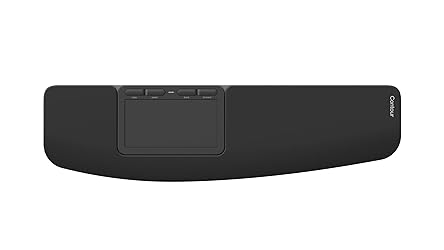
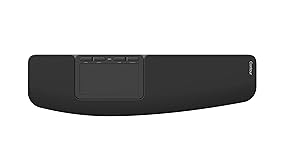
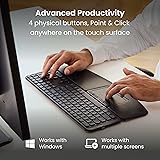
Contour Design Touch: Wireless Bluetooth Ergonomic Touchpad for Windows 10 & 11, Multi Touch & High Precision Glass Trackpad, Click Anywhere, 4 Programmable Shortcut Keys, Full Size Wrist Rest
Color:
Wireless - Black
Detalles del producto
Disponibilidad
En stock
En stock
Peso con empaque
0.52 kg
0.52 kg
Devolución
Sí
Sí
Condición
Nuevo
Nuevo
Producto de
Amazon
Amazon
Viaja desde
USA
USA
Sobre este producto
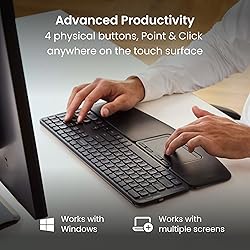
- Designed for professional computer users like you who are experiencing frequent shoulder pain, Contour Touch is a ergonomic touchpad specifically designed for Windows. Contour Touch is designed to be positioned beneath a full-size keyboard to eliminiate the need of reaching to the side, keeping your arms and hands in a natural position, reducing shoulder discomfort.You don’t need to learn how to use a new device to get started with Contour Touch. Just swipe, tap, click, and use all your favorite multi-touch gestures right out of the box.The smooth glass touchpad enables you to tap or click anywhere across its entire surface, further reducing the daily strain of unnecessary movements. And as it’s expertly engineered to feel tactile and super responsive, you’ll enjoy precise, time-saving navigation.It’s equipped with four programmable shortcut buttons and settings you can easily personalize in the App or Windows settings.And because it comes with a full-size wrist rest, you get truly comfortable wrist and palm support while using your computer.Make the most of your pain-free touchpad by pairing it with the large Balance Keyboard – it’s fully compatible in length and height, and can be firmly attached.All in all, Contour Touch brings you pain-free productivity from day one.
$355,32
49% OFF
$182,22
IMPORT EASILY
By purchasing this product you can deduct VAT with your RUT number
$355,32
49% OFF
$182,22
Envío gratis
 Llega en 5 a 12 días hábiles
Con envío
 Tienes garantia de entrega
Este producto viaja
de USA ![]() a tus manos en
a tus manos en
![]()
 a tus manos en

Conoce más detalles
ERGONOMIC TOUCHPAD FOR SHOULDER COMFORT: Contour Touch sits beneath your keyboard to eliminate reaching for a mouse. This centralized position helps keep your hands within shoulder width, reducing strain on your neck, shoulders, and forearms. FAMILIAR, HIGH-PERFORMANCE INTERACTION: The high-resolution glass touchpad has a smooth surface for precise, effortless finger movements. The click-anywhere feature lets you interact naturally without being limited to specific zones. ADVANCED PRODUCTIVITY: There is native support for the usual Windows multi finger gestures. Scroll, zoom, back and forward navigation to keep you productive while on your computer. And the four shortcut buttons (Copy/Paste, Back/Forward) help you stay efficient too. CUSTOMIZABLE EXPERIENCE TO MEET YOUR NEEDS - Touchpad speed settings and commands can be changed in the Windows settings menu or on the Contour Driver, so you can customize your touchpad to your needs. The 4 buttons above the touchpad area are also customizable with Contour Driver. HIGH LEVEL OF COMFORT: With a full-size wrist rest, you get truly comfortable wrist and palm support while using your keyboard. The smooth surface provides frictionless transition between typing and mousing or computer navigation.
Compra protegida
Disfruta de una experiencia de compra segura y confiable
![]() Garantía de entrega
Garantía de entrega
Con Tiendamia todas tus compras cuentan con Garantía de Entrega o devolución total de tu dinero.
Compras 100% seguras y garantizadas, para que pidas lo que sueñas y lo recibas del mundo a tu puerta.
Tarjetas de Débito y Crédito

Visa

Mastercard

American Express

Dinners

Discover

Alias
Pagos a través de PayPal
Compra procesada en dólares con dinero en cuenta o tarjetas internacionales.

PayPal

.svg)
