








 Garantía de entrega







Artículo: AMZ-B0FPCG9HDV
SZILBZ
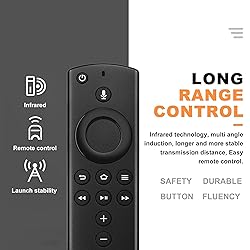
Replacement Voice Remote Control fit for Fire Smart TVs Stick 4K/2nd Gen,TV Cube(1st Ge/2nd Gen),3rd Gen Smart TVs,Not for Samsung/Roku TV
Detalles del producto
Disponibilidad
Sin stock
Sin stock
Peso con empaque
0.20 kg
0.20 kg
Devolución
No
No
Condición
Nuevo
Nuevo
Producto de
Amazon
Amazon
Viaja desde
USA
USA
Sobre este producto
- Replacement Voice Remote How to pair your TV stick?Press the Home button for about 10-15 seconds, the indicator light will blink slowly for 10-30 seconds, when the remote control is in pairing mode, the indicator light will blink faster, when pairing is completed, the indicator light will turn off. If you have any questions, please contact us. Compatible with Streaming Device Models :for Smart TVs Stick 4K(1st Gen)for Smart TVs Stick 4K(2nd Gen)for Smart TVs Stick 4K Max(1st Gen)for Smart TVs Stick Litefor Smart TVs Stick (2nd Gen)for Smart TVs Stick (3rd Gen)for Smart TVs Cube (1st Gen)for Smart TVs Cube (2nd Gen)for Smart TVs Cube (3rd Gen)for Smart TVs (3rd Gen)Compatible with Remote Models : for Smart TVs Stick Lite for Smart TVs (2nd Gen)for Smart TVs (3rd Gen)for Insignia/Toshiba smart TVs Remote Control(CT-RC1US-21,NS-RCFNA-21, CT-95018, NS-RCFNA-19,CT-RC1US-19) etc. Compatible with TV Models:for Insignia smart TVs: F20/ F30 / F50 / DF710 / DF711 / DF310 / DF311 /DF510 / DF620 series.for Toshiba smart TVs: C350 /M550 /LF711 / LF221U /LF621U / LF421U / LF711 / A810U / A710U / V35 seriesfor Pioneer TVs PN851 / PN951 / PN450 / PN651 series.for Omni / Omni QLED Series, 2-Series / 4-Series smart TVs.

Sin stock
Seleccione otra opción o busque otro producto.
Este producto viaja
de USA ![]() a tus manos en
a tus manos en
![]()
 a tus manos en

Conoce más detalles
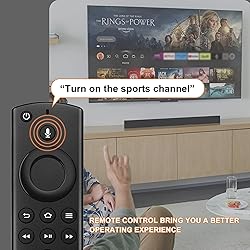
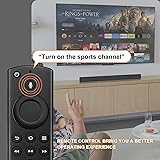
COMPATIBLE MODEL:Replacement Voice Remote fit for Smart TVs (3rd Gen),fit for Smart TVs Stick 4K,fit for Smart TVs Stick Lite,fit for Smart TVs Stick (2nd Gen),fit for 1st and 2nd Gen Smart TVs Cube,and Smart TVs Stick 2020 Release INCOMPATIBLE MODEL: Not fit for Smart TVs(1st and 2nd Gen), not fit for Smart TVs Stick(1st Gen), not fit for Smart TVs Edition VOICE FUNCTION: Voice function: Easily control with our voice remote control: Just say commands such as "Turn on TV", "Volume up" or "Switch to sports channel" to immediately operate your device - no buttons required HOW TO PAIR: Press and hold the Home key for about 10 seconds. Observe the indicator light of the remote control: When successfully entering the pairing mode, the LED light starts to flash rapidly. Wait for about 30 to 60 seconds. When the LED light on the remote control goes out, the pairing is successful and the remote control can be used immediately. (If the indicator light does not flash, check the battery level or replace the battery and try again) PLEASE NOTE: 1.Replacement voice remote control needs to be matched manually. 2.When matching, it shows that it needs to be updated, please press the voice button or return button. 3. When not working, please manually add and replace the remote control. 4. If the new remote control can't be connected, please remove and reinsert its batteries
Compra protegida
Disfruta de una experiencia de compra segura y confiable
![]() Garantía de entrega
Garantía de entrega
Con Tiendamia todas tus compras cuentan con Garantía de Entrega o devolución total de tu dinero.
Compras 100% seguras y garantizadas, para que pidas lo que sueñas y lo recibas del mundo a tu puerta.
Tarjetas de Débito y Crédito

Visa

Mastercard

American Express

Dinners

Discover

Alias
Pagos a través de PayPal
Compra procesada en dólares con dinero en cuenta o tarjetas internacionales.

PayPal

.svg)
 Garantía de entrega