


 Garantía de entrega






Artículo: AMZ-B0FP19QM42
Opluz
XD Card Reader, SD Memory Card Reader for iPhone, Lightning+USB A+USB C to SD/TF/XD Picture Card Reader 3 in 1 Digital Camera Adapter for iPhone 17/16/15/14/iPad/PC/Android Multi iPhone Reader
Color:
White
Detalles del producto
Disponibilidad
En stock
En stock
Peso con empaque
0.20 kg
0.20 kg
Devolución
Sí
Sí
Condición
Nuevo
Nuevo
Producto de
Amazon
Amazon
Viaja desde
USA
USA
Sobre este producto
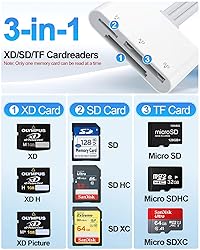
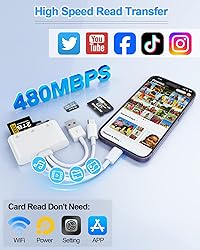
- Ultra-fast Data Transfer: With maximum transfer speed of 480Mbps, the XD card reader can transfer photos and videos from your camera to your iPhone in seconds. It supports standard photo formats, JPEG, RAW and SD/HD video formats, including H.264 and MPEG-4(Support exFAT ,NOT support NTFS). It allows you to quickly transfer large files and photos, saving your precious time. All-round design, fully compatible: The sd card reader has three data cable ports: USB C+Lightning+USB A, supporting connection to iPhone, iPad, computer and Andrsoid devices. It also has three memory card slots: XD card slot/SD card slot/TF card slot, compatible with SD, SDHC, SDXC, MicroSD, MicroSDXC, MicroSDHC and XD memory card Powerful practicality: The sd card reader for iphone supports data transfer of files with a maximum memory of 2TB. It is suitable for memory cards of Pocket 3/Gopro/dash cam/camera/mobile phone/surveillance/drone and other devices. The card reader is not limited to a single memory card type, which is very practical. Two-way transmission: The micro sd card reader supports two-way data transmission. The card reader not only supports the transfer of SD card data to iPhone/iPad, but also can transfer iPhone data to SD card, expanding the device storage space. Plug and Play: No need to connect to the application, no Internet connection, no additional drivers or software, just connect the xd card adapter to the device and the data transfer will be completed in seconds.
$47,14
55% OFF
$21,43
IMPORT EASILY
By purchasing this product you can deduct VAT with your RUT number
$47,14
55% OFF
$21,43
Envío gratis
 Llega en 5 a 12 días hábiles
Con envío
 Tienes garantia de entrega
Este producto viaja
de USA ![]() a tus manos en
a tus manos en
![]()
 a tus manos en

Conoce más detalles
3-in-1 XD Picture Card Reader: Triple-Interface XD/SD card reader Adapter with Lightning/USB-C/USB-A connector to fit iPhone, iPad, Android phones, PCs, MacBooks and Surface and all devices you need. Carry 3 in 1 SD/TF/XD Card Reader Adapter to demand all your need Professional Camera Card Reader for Photographer: This xd card reader for iphone with three dedicated card slots (SD/TF/XD) supporting SD/SDHC/SDXC, MicroSD/MicroSDHC/MicroSDXC, and XD memory cards. 480 Mbps Ultra-fast Data Transfer: This Fujifilm XD Card Reader With maximum transfer speed of 480Mbps, can transfer photos and videos from your camera to your iPhone in seconds. Perfect for HD content creators needing rapid, reliable file management. Lightning to sd card reader supports standard photo formats, JPEG, RAW and SD/HD video formats, including H.264 and MPEG-4(Support exFAT ,NOT support NTFS) Plug and Play: The xd card adapter No need to connect to the application, no Internet connection, no additional drivers or software, just connect the xd picture card reader to the device and the data transfer will be completed in seconds. Two-way transmission: The Lightning to sd card reader supports two-way data transmission. The card reader not only supports the transfer of SD card data to iPhone/iPad, but also can transfer iPhone data to SD card, expanding the device storage space. The sd card reader for iphone supports data transfer of files with a maximum memory of 2TB.iphone sd card reader suitable for memory cards of Pocket 3/Gopro/dash cam/camera/mobile phone/surveillance/drone and other devices Universal Compatibility: This sd card reader for iPhone 17-8 series, iPad, Samsung Galaxy, Google Pixel, MacBook, Surface laptop and PC.Compatible with most systems--Mac OS, iOS, Android, Linux, Chrome OS, Windows XP/Vista/7/8/8.1/10,11,etc. Any problem just contact us without hesitation, we will provide a solution that meets your satisfaction. Important Notes: 1) Ensure the memory card is formatted to a supported file system (e.g., exFAT). NTFS is not supported; 2) Due to system limitations, the card reader can read only one card at a time. Do not insert two cards simultaneously; 3) For Android devices, insert the memory card into the card reader first, then connect the card reader to the device. When changing memory cards, unplug the card reader and reconnect it after inserting the new card to avoid recognition issues.
Compra protegida
Disfruta de una experiencia de compra segura y confiable
![]() Garantía de entrega
Garantía de entrega
Con Tiendamia todas tus compras cuentan con Garantía de Entrega o devolución total de tu dinero.
Compras 100% seguras y garantizadas, para que pidas lo que sueñas y lo recibas del mundo a tu puerta.
Tarjetas de Débito y Crédito

Visa

Mastercard

American Express

Dinners

Discover

Alias
Pagos a través de PayPal
Compra procesada en dólares con dinero en cuenta o tarjetas internacionales.

PayPal

.svg)
