


 Garantía de entrega






Artículo: AMZ-B0F91DFPQQ
PeroBuno
PeroBuno External CD DVD Drive, USB 3.0 Type-C Optical Drive, 0.5-inch Ultra-Slim Portable DVD CD ROM Disc Player Reader Writer Rewriter Burner Recorder for Laptop PC MacBook Windows Linux Mac OS
Color:
Black Ultra-Slim
Detalles del producto
Disponibilidad
En stock
En stock
Peso con empaque
0.34 kg
0.34 kg
Devolución
Sí
Sí
Condición
Nuevo
Nuevo
Producto de
Amazon
Amazon
Viaja desde
USA
USA
Sobre este producto
- PeroBuno External CD&DVD Drives Abandoning optical drives allows computer manufacturers to create thinner and more compact laptops. Most of the new notebooks on the market now do not built-in CD-ROM drive. In order to make laptops thinner and have higher transmission speeds, some even only have Type C ports. But we may have a large collection of 90s CDs, and we want to put them in a laptop to feel the nostalgia or insert a DVD collection to watch movies. Or, you may just need a CD/DVD drive for emergencies, such as data transfer, system backup, etc.Fortunately, We have already done all the work for you. This multi-function 2 in 1 USB A/USB C data cable external USB 3.0 disc drive that PeroBuno launched is not only a CD/DVD reader, but also it has the function of CD/DVD burner. As a professional manufacturer with 30 years of experience, PeroBuno is committed to producing high-quality and reliable external CD/DVD drives. Each PeroBuno USB CD/DVD drive is equipped with an ultra-thin movement with excellent performance, strong error correction, low impedance and anti-interference capabilities, ensuring stable, quiet and smooth operation. And the price is affordable. This will allow you to have more budget to buy the latest laptops that are comfortable, smooth, and have powerful processors and graphics cards.THESE THINGS YOU NEED TO KNOW BEFORE BUYING - This DVD RW drive can only start its job after it is connected to a laptop or a desktop, so it is not compatible with TVs, cars, trucks, projectors, tablets, iPads, phones, PS4/5, Xbox, Nintendo Switch, Chromebook, surface (some models), etc. In addition, it is compatible with Windows11/10/8/7/XP/Vista, Mac OS and Linux. Not compatible with Chrome OS, Ubuntu system and Blu-ray disc. Don’t Let Missing Disc Drives Limit You - Order Yours Today! Upgrade your digital experience with our Ultra-Slim USB CD DVD Drive! Designed for modern laptops and desktops (with no built-in disc reader), this portable CD DVD burner offers seamless plug-and-play functionality—no setup required. With USB 3.0 technology, enjoy lightning-fast read/write speeds while burning CDs, watching DVDs, or installing old software/games. The sleek, durable design ensures easy portability, and the no-slip tray keeps discs secure during use. Ideal for: Installing legacy software or OS Watching DVD movies on the go Burning music, photos, or data backups Students, professionals, and home users Product Specification Model: BT620Color: Black Weight: 285g/0.63lb Size: 148*147*13mm/5.8*5.8*0.5in Length of Cable: 29cm/11.5inPower Supply: DC 5V/1.5ATransport Interface: Built-in 2 in 1 USB 3.0 Type-A/Type-C data cable (on the back of the USB CD drive) Supported Disc Types: CD-ROM, CD-R, CD±RW, DVD-ROM, DVD-RAM, DVD±R, DVD±RW, DVD±R DL, VCD and SVCDSupported Discs Read and Write Speeds: CD-ROM 24x, CD-R 24x, CD±RW 8x, DVD-ROM 8x, DVD±R 8x, DVD±RW 8x, DVD±R DL 4xCompatible Operating System: Windows 11/10/8/7/XP, Windows Vista7/8, Mac OS, Linux Compatible with MacBook, Mac, iMac, laptop, desktop, PC and notebook computers (for Apple MacBook, MacBook Air, MacBook Pro, iMac, Mac, Mac mini, Mac Studio, Mac Pro, HP, Dell, Lenovo, Thinkpad, LG, Samsung, Toshiba,Panasonic, SONY, VAIO, SHARP, FUJITSU, NEC, MSI, Acer, ASUS, etc.)Computer Output for CD/DVD Drive: 3-5V / 1.5-2A, power below this may cause recognition failure or read failure. Package Included PeroBuno External Disk Drive * 1 User Manual * 1 Some things to note about this USB 3.0 CD ROM external drive 1. The DVD drive should be connected directly to the laptop's USB port, not through a USB HUB. In addition, please connect the external CD burner with USB port behind of computer host if you use a desktop.2. Ensure CDs is placed well and not scratched. The raised fixing post in the middle of the CD drive tray has three spring buckles. You need to gently press the CD disc into the spring buckles to secure the disc.3. Make sure your computer's CD/DVD driver is intact before using an external DVD drive for laptop. The computer operating system comes with a CD/DVD driver. If the program is damaged or removed, the CD/DVD driver needs to be updated or reinstalled.4. Setting the DVD Region to United States on the "DVD RW Drive" - Properties - click Hardware Tab - click Properties button - then choose country Region (US is 1) and click OK to apply. Note: You are only allowed to change the region code 4-5 times.5. Insert the external CD drive for PC into the computer. After the Windows system recognizes the DVD burner, the "DVD RW Drive" icon will be displayed. The Mac OS computer will not display the device icon until the disc is placed in the CD burner and the disc is read successfully.6. WINDOWS 11 needs a media player (such as VLC ) and a network connection.7. Computers often do not natively support DVD movie playing, so a third-party media player (such as VLC) must be downloaded and installed to watch DVDs using this CD/DVD player. You can download and install a playing/burning software you like. You can also refer to the following software:Free DVD player software: Any Media Player, Any DVDFree burning software for Windows operating systems: InfraRecorder, Ones, Express Disc BurnerFree burning software for Mac OS: Burn for macFree burning software for Linux OS/Unix OS: K3b (KDE Burn Baby Burn)8. Because the video formats of most computers and mobile phones are not compatible with DVD, you need third-party software to convert the file format to a format that can be displayed on the disc, otherwise, even if you burn the file to a disc, it will not work.9. The Mac OS system comes with a burning function:Connect the CD drive for mac and put the disc into it - click "File" on the top menu bar - click on the new "Burn Folder" - drag the files to be burned into the "Burn Folder" - click "Burn to Disc" - and then You can eject the disc. But one thing to note is that Mac OS computers can only burn blank discs, and a disc can only be burned once.10. For the Mac OS, you need to eject the disc through the Mac OS command. At this time, pressing the eject key of the CD reader for mac will not work. Tips 1. Internal laser light source may be harmful to the eyes of the face, please do not look directly.2. Do not have the USB CD player on a strong magnetic object nearby.3. Keep the USB DVD player steady on the desktop, do not put it unstable items.4. Do not put the CD adapter for laptop on the vulnerable to squeeze place, to ensure normal CD reader for PC use.5. Data transfer speed is also affected by computer and system environment.6. Do not support TV / car / truck / projector / tablet / iPad / smartphone / PS 5 / Xbox / Nintendo Switch / Chromebook / surface (some models) / Ubuntu system / blu ray disk.
$44,39
49% OFF
$22,77
IMPORT EASILY
By purchasing this product you can deduct VAT with your RUT number
$44,39
49% OFF
$22,77
Envío gratis
 Llega en 5 a 12 días hábiles
Con envío
 Tienes garantia de entrega
Este producto viaja
de USA ![]() a tus manos en
a tus manos en
![]()
 a tus manos en

Conoce más detalles
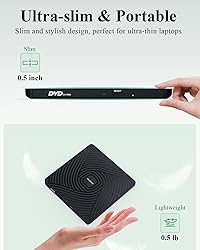
【Ultra-Slim & Portable External DVD Drive】Only 13mm thickness,Lightweight, compact design perfect for travel, work, or home use. Fits easily in your bag! And it's the perfect companion for ultra-thin laptops! 【Plug & Play External CD Drive】No external power or drivers needed. Simply connect via USB for instant reading/writing. 2-in-1 USB A and USB C cables are built into the bottom of the usb dvd drive, so you can take them out whenever you need them and plug them back in after use,saying goodbye to carrying extra annoying cables. 【High-Speed USB 3.0 Disc Drive】Delivers fast data transfer (up to 5Gbps) and smooth CD/DVD reading and burning (backward compatible with USB 2.0). The usb disc drive provides up to 8x DVD read/write speed and up to 24x CD read/write speed. 【Wide Compatibility External Disc Drive】The external dvd burner is compatible with Windows 11/10/8/7/Vista/XP/2000/98/SE/ME, Mac OS, and Linux (Ubuntu is not supported).This external cd/dvd drive for laptop supports CD+/-R/RW, CD-ROM, DVD+/-R/RW, DVD+/-R DL, DVD-ROM, DVD-RAM, VCD, and SVCD. Note: Blu-ray discs are not supported. WINDOWS 11 needs a media player (such as VLC ) and a network connection. 【Multi-Functional USB Disk Drive】Perfect for installing software, system, games, watching movies, listening to music, burning discs, and backing up files. 【Buy with Confidence】All PeroBuno external optical drives are rigorously tested before shipment to ensure optimal condition. If the disk drive you received does not work properly for any reason, please contact us and we will definitely help you solve any product problems. PeroBuno provide up to 2 years of after-sales guarantee. 【Things to Know Before You Buy】① This disc player needs to be connected to a laptop or desktop to start working, so it is not compatible with cars, TVs, projectors, tablets, iPads, mobile phones, PS 4/5, Xbox, Nintendo Switch, Chrombooks, Surface, Ubuntu systems, or Blu-ray discs. ② Due to limitations of Mac OS, the tray can't be opened by the button after playing or burning a disc. To eject a disc on a Mac, right-click the desktop icon and select "Eject", or select "File" > "Eject" from the menu. ③ For desktop computers, connect the cd reader to the USB port on the back of the computer motherboard.
Compra protegida
Disfruta de una experiencia de compra segura y confiable
![]() Garantía de entrega
Garantía de entrega
Con Tiendamia todas tus compras cuentan con Garantía de Entrega o devolución total de tu dinero.
Compras 100% seguras y garantizadas, para que pidas lo que sueñas y lo recibas del mundo a tu puerta.
Tarjetas de Débito y Crédito

Visa

Mastercard

American Express

Dinners

Discover

Alias
Pagos a través de PayPal
Compra procesada en dólares con dinero en cuenta o tarjetas internacionales.

PayPal

.svg)
