


 Garantía de entrega







Artículo: AMZ-B0DKFD1B18
yalanle
Replacement Voice Remote Control Fit for Fire Smart TVs Stick, TV Cube, TV Lite, Stick 4K/4K Max (1st / 2nd Gen), and Fit for All Insignia, Toshiba, Pioneer Smart TV
Style:
3rd Gen Pro
Detalles del producto
Disponibilidad
En stock
En stock
Peso con empaque
0.20 kg
0.20 kg
Devolución
Sí
Sí
Condición
Nuevo
Nuevo
Producto de
Amazon
Amazon
Viaja desde
USA
USA
Sobre este producto
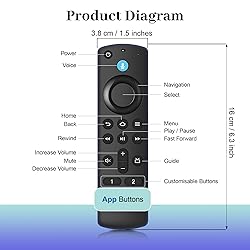
- Specifications: Material: Plastic Color:Black Package includes: 1* Product manual 1* New 2rd Gen voice remote control (not including 2 AAA batteries) Applicable Streaming Device Models: Smart TVs Cube 1st Gen Smart TVs Cube 2nd Gen Smart TVs Cube 3rd Gen Smart TVs Stick 2nd Gen Smart TVs Stick 3rd Gen Smart TVs Stick Lite Smart TVs Stick 4K 1st Gen Smart TVs Stick 4K 2nd Gen Smart TVs Stick 4K Max 1st Gen Smart TVs Stick 4K Max 2nd Gen Smart TVs 3rd Gen Applicable TV Models: Toshiba Smart TVs LF711 / LF621U / LF421U / LF221U / C350 / A810U / A710U / M550 / V35 series Insignia Smart TVs F30 / F20 / F50 / DF710 / DF711 / DF310 / DF510 / DF311 / DF620 series Pioneer TVs PN450 / PN651 / PN851 / PN951 series Smart TV Omni Series Omni QLED Series Smart TV 4-Series Smart TV 2-Series Applicable Remote Model: Insignia/Toshiba TV remote control (NS-RCFNA-21, CT-95018, CT-RC1US-21, NS-RCFNA-19,CT-RC1US-19) etc voice remote (2nd Gen/3rd Gen/Lite/Lite 2nd Gen) How to pair: Step 1: Press the Smart Remote's POWER Button and OK Button at the same time for 2 second. The red LED at the front of the Smart Remote will be long lighting. Step 2: Put the Smart Remote's IR sender directly face to your TV Set remote's lR sender. Press 2 second TV Set's Remote Power button that you want to learn. Step 3: Red LED will be shining 3 times quickly. That means learning succeeds.
$35,47
60% OFF
$14,19
IMPORT EASILY
By purchasing this product you can deduct VAT with your RUT number
$35,47
60% OFF
$14,19
Envío gratis
 Llega en 5 a 12 días hábiles
Con envío
 Tienes garantia de entrega
Este producto viaja
de USA ![]() a tus manos en
a tus manos en
![]()
 a tus manos en

Conoce más detalles
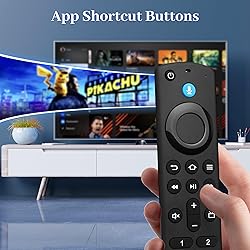
Applicable Streaming Device: This Smart tv voice remote replacement is compatible with various smart devices, TVs Stick (2nd / 3rd Gen), TVs Stick Lite, TVs Stick 4K Max (1st Gen), TVs Stick 4K (1st / 2nd Gen), TVs Cube (1st / 2nd / 3rd Gen), Smart TVs (3rd Gen).Also compatible with select Insignia, Toshiba & Pioneer smart TV models Applicable Remote Model: Replacement tv stick remote for Insignia/Toshiba TV remote control (NS-RCFNA-21, CT-95018, CT-RC1US-21, NS-RCFNA-19,CT-RC1US-19) etc, and for voice remote (2nd Gen/3rd Gen/Lite/Lite 2nd Gen) Voice Control : Stick remote control with voice search function, You can ask it to find your favorite content, Quickly jump to your favorite scenes with standard navigation and playback controls Easy to Pairing: Pair before use, press the Home button about 10-15 seconds, the indicator LED will slowly flash amber for 10 seconds, waiting about 30-60 seconds (Entering Pairing mode, LED Flash), then remote should automatically Pair with your device. then flash faster when your remote is ready to connect Package Include : 1 x voice remote control, 1 x user manual (Notice: 2 x AAA batteries not include)
Compra protegida
Disfruta de una experiencia de compra segura y confiable
![]() Garantía de entrega
Garantía de entrega
Con Tiendamia todas tus compras cuentan con Garantía de Entrega o devolución total de tu dinero.
Compras 100% seguras y garantizadas, para que pidas lo que sueñas y lo recibas del mundo a tu puerta.
Tarjetas de Débito y Crédito

Visa

Mastercard

American Express

Dinners

Discover

Alias
Pagos a través de PayPal
Compra procesada en dólares con dinero en cuenta o tarjetas internacionales.

PayPal

.svg)
