


 Garantía de entrega





Artículo: AMZ-B0BMG9C44B
AZMKIMI
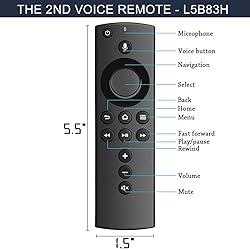
TV Remote Control Replacement for L5B83H Stick 2nd Gen, Remote Control LY73PR E9L29Y with Voice(Include TV Control) (Black)
Detalles del producto
Disponibilidad
En stock
En stock
Peso con empaque
0.20 kg
0.20 kg
Devolución
Sí
Sí
Condición
Nuevo
Nuevo
Producto de
Amazon
Amazon
Viaja desde
USA
USA
Sobre este producto
- How to Pair Manually by F-TV APP (If automatically pairing failed, please pair it manually via Ftelevision app or original stick remote) 1. Download the F-TV APP. 2. Log in the same account as your Fstick, and then connect with your Fstick, now you can control your Fstick by mobile. 3. Go to F-TV Setting, and choose Controllers & Bluetooth Devices. 4. Go to Remotes and Add New Remote 5. Hold HOME button until red light flashing(in pairing mode). 6. When red light off, pairing succeed. You can also Pair by stock Fstick Remote Manually.
$40,82
49% OFF
$20,93
IMPORT EASILY
By purchasing this product you can deduct VAT with your RUT number
$40,82
49% OFF
$20,93
Envío gratis
 Llega en 5 a 12 días hábiles
Con envío
 Tienes garantia de entrega
Este producto viaja
de USA ![]() a tus manos en
a tus manos en
![]()
 a tus manos en

Conoce más detalles
Compatible with Stick / Fcube Television(LY73PR S3L46N LDC9WZ E9L29Y EX69VW A78V3N) Not Compatible with Smart TV. Not out of box. Please read manual carefully or contact us if any problems. Pair Automatically: Press the Home button for about 8-30 seconds until the LED starts flashing amber quickly, then remote replacement Pair successfully. If automatically pair failed, pls pair it manually via App, or via original remote. After that let you control your TV.
Compra protegida
Disfruta de una experiencia de compra segura y confiable
![]() Garantía de entrega
Garantía de entrega
Con Tiendamia todas tus compras cuentan con Garantía de Entrega o devolución total de tu dinero.
Compras 100% seguras y garantizadas, para que pidas lo que sueñas y lo recibas del mundo a tu puerta.
Tarjetas de Débito y Crédito

Visa

Mastercard

American Express

Dinners

Discover

Alias
Pagos a través de PayPal
Compra procesada en dólares con dinero en cuenta o tarjetas internacionales.

PayPal

.svg)
