






 Garantía de entrega








Artículo: AMZ-B0BLHN22SF
Phomemo
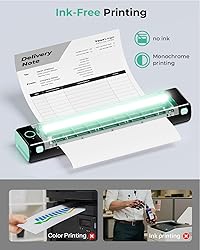
Phomemo Portable Printers Wireless for Travel - Bluetooth Thermal Printer Supports 8.5" X 11" Letter, Inkless Printer Compatible with Phone Laptop for Home Use Car School Office, Come with Carry Case
Color:
Black
Style:
1 Printer + 10 Sheets of Thermal Paper + 1 Case
Detalles del producto
Disponibilidad
En stock
En stock
Peso con empaque
0.79 kg
0.79 kg
Devolución
Sí
Sí
Condición
Nuevo
Nuevo
Producto de
Amazon
Amazon
Viaja desde
USA
USA
Sobre este producto
- The box contains: The portable printer. Soft storage pouch. USB pen drive containing drivers for PC&nb sp;and Mac. USB-A to USB C charging cable (80cm). 5 sheets Letter thermal paper. Instructions.
$309,90
60% OFF
$123,96
IMPORT EASILY
By purchasing this product you can deduct VAT with your RUT number
$309,90
60% OFF
$123,96
Envío gratis
 Llega en 5 a 12 días hábiles
Con envío
 Tienes garantia de entrega
Este producto viaja
de USA ![]() a tus manos en
a tus manos en
![]()
 a tus manos en

Conoce más detalles
Bluetooth Printer【Go Wireless by Bluetooth】Get the "Phomemo" app from Google Play or Apple Store to print via Bluetooth on your M08F Portable Printer for iOS and Android. (Note: All devices cannot be directly connected to Bluetooth and need to be used through the Phomemo app.) Inkless Printer【Inkless Printing】Small Printer use thermal technology - don't require ink, toner, or ribbons, no ink-related blockages and cleaning issues. And instead you only need to replace the thermal paper and you're good to go, each thermal paper costs only $0.12, cheaper than traditional ink cartridges + paper. (Note: Phomemo Portable printer is a thermal printer and only supports thermal printing paper, not support regular copy paper) Phone Printer【Strong Compatibility】Print PDF, Word, Images, Web from your phone—whenever, wherever. You can also use a USB cable to connect for computer printing; (PC devices only works with USB connection, needs to download the driver first: m08f.phomemo.com) 【How to Print on Phones】1.) Power on printer. 2.) Download the “Phomemo” from your app store. 3). Enable Bluetooth on your phone > return to the Phomemo app & and click to add device. 4.) Selected the M08F (for this model)- wait for one second you should be connected. It took not even 5 minutes to set up and print. **If pairing took too long - reboot the printer by holding the power button down then back on again & and return to the app to pair. It was so easy to set up.Go Wireless by Bluetooth Perfect Gift : Phomemo portable thermal printer can print clear image, DIY drawings and Files. It's perfect for busy professionals and school students. Come with a carry case, making it as a perfect gift and suprise for your families and friends.
Compra protegida
Disfruta de una experiencia de compra segura y confiable
![]() Garantía de entrega
Garantía de entrega
Con Tiendamia todas tus compras cuentan con Garantía de Entrega o devolución total de tu dinero.
Compras 100% seguras y garantizadas, para que pidas lo que sueñas y lo recibas del mundo a tu puerta.
Tarjetas de Débito y Crédito

Visa

Mastercard

American Express

Dinners

Discover

Alias
Pagos a través de PayPal
Compra procesada en dólares con dinero en cuenta o tarjetas internacionales.

PayPal

.svg)
