


 Garantía de entrega


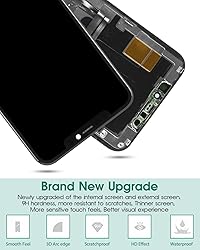




Artículo: AMZ-B09NRKXS7V
SRJTEK
for iPhone 11 Pro Screen Replacement for iPhone 11 Pro LCD Digitizer 11 Pro Display Touch Sensor Assembly Accessories Kits A2215, A2160, A2217 (Incell,Black)
Detalles del producto
Disponibilidad
En stock
En stock
Peso con empaque
0.27 kg
0.27 kg
Devolución
Sí
Sí
Condición
Nuevo
Nuevo
Producto de
Amazon
Amazon
Viaja desde
USA
USA
Sobre este producto
- Our Screen Is High Quality LCD With Touch Screen For iPhone 11 Pro Product Description:-Material: Incell -Suitable For: For iPhone 11 Pro LCD Screen Replacement-Model Number: A2215, A2160, A2217-Size: 5.8 Inch Package Including:1x For iPhone 11 Pro LCD With Touch Screen With Digitizer Assembly1x A Set Of Special Disassembly Tools Tips:1. Check whether the product is in good condition and test it before installation. Do not remove protective film or labels during testing. Watch out for static issues.2. The screen is glass, which is a very fragile product. Testing before installation is strongly recommended.3. Do not bend the cable. During installation and testing, make sure the LCD cable is not bent.4. If your phone has a black screen during installation, press and hold the power key and volume key at the same time. If the phone vibrates, it's because the mainline is not installed properly. Then reinstall the product.5. For non-professionals or those without electronic repair experience, self- screen replacement is not recommended. Take it to a repair shop or find installation videos on YouTube and follow the steps to save time and money.
$63,95
60% OFF
$25,58
IMPORT EASILY
By purchasing this product you can deduct VAT with your RUT number
$63,95
60% OFF
$25,58
Envío gratis
 Llega en 5 a 12 días hábiles
Con envío
 Tienes garantia de entrega
Este producto viaja
de USA ![]() a tus manos en
a tus manos en
![]()
 a tus manos en

Conoce más detalles
AAA+ Quality: Our screen is INCELL material, NOT ORIGINAL screen. But our screen also High Quality screen, the display effect close to the original. The quality inspectors strictly tested our screens one by one to ensure that all products work properly. If the LCD screen is damaged during transportation or during installation, which causes the screen not work properly, we will replace a brand new and fully working well screen. Perfect Compatibility: For iPhone 11 Pro A2215, A2160, A2217 5.8".Please check your phone's model carefully before ordering.This product is made of TFT, so it is thicker than the original screen and the overall display area of the screen is smaller. This product does not have fingerprint recognition, after replacing the screen will no longer be able to use this function, please buy with caution 【Installation Precautions】: 1.Electrostatic Protection: Wash your hands to discharge static electricity before operation, or wear an anti-static wristband. Avoid operating in environments prone to static electricity such as carpets and chemical fiber clothing; 2.Flex Cable Operation: Unplug and plug flex cables only when the power is off. Hold only the plastic part of the interface; avoid pulling the cable or damaging the clips. Operate the clips gently and do not break them. 3.Avoid Forced Operation: Do not pry or pull hard when encountering tight adhesion or resistance during disassembly. Complete Repair Kit: Each package includes 1×For iPhone 11 Pro LCD Touch screen replacement and a set of professional opening kits (Note: Install screws according to the recorded positions during disassembly. Avoid damaging the shell or motherboard due to mismatched screw lengths or thicknesses) , allowing for an easy and safe screen replacement. No need for additional purchases, saving you both time and money 【Installation NOTE】: 1. Check whether the product is in good condition and test it before installation. Do not remove protective film or labels during testing. Watch out for static issues; 2. The screen is glass, which is a very fragile product. Testing before installation is strongly recommended; 3. Do not bend the cable. During installation and testing, make sure the LCD cable is not bent; 4. If your phone has a black screen during installation, press and hold the power key and volume key at the same time. If the phone vibrates, it's because the mainline is not installed properly. Then reinstall the product.
Compra protegida
Disfruta de una experiencia de compra segura y confiable
![]() Garantía de entrega
Garantía de entrega
Con Tiendamia todas tus compras cuentan con Garantía de Entrega o devolución total de tu dinero.
Compras 100% seguras y garantizadas, para que pidas lo que sueñas y lo recibas del mundo a tu puerta.
Tarjetas de Débito y Crédito

Visa

Mastercard

American Express

Dinners

Discover

Alias
Pagos a través de PayPal
Compra procesada en dólares con dinero en cuenta o tarjetas internacionales.

PayPal

.svg)
