













 Garantía de entrega




Artículo: AMZ-B09K2G3Y99
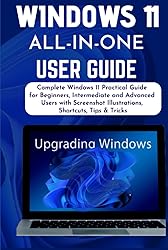
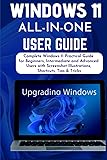
WINDOWS 11 ALL-IN-ONE USER GUIDE: Complete Windows 11 Practical Guide for Beginners, Intermediate and Advanced Users with Screenshot Illustrations, Shortcuts, Tips & Tricks
Format:
Hardcover
Detalles del producto
Disponibilidad
En stock
En stock
Peso con empaque
0.44 kg
0.44 kg
Devolución
Sí
Sí
Condición
Nuevo
Nuevo
Producto de
Amazon
Amazon
Viaja desde
USA
USA
Sobre este producto
- LEARN WINDOWS 11 STEP-BY-STEP Finally, the long-awaited Windows 11 OS is finally here. The new operating system, Windows 11, possesses new features, and irrespective of the fact that this operating system may appear like its predecessor, it is much better and impressive. There are new settings and designs to the overall look of the software. Improvement has been made to the Start menu, the ability to download and run Android applications on your computer, and lots more. This book is an in-depth guide that will help you in maximizing your experience with the new Windows 11 operating system. Those who show interest in knowing all about Windows 11 will receive a coherent guide to all they need to know with the step-by-step guidelines sequentially backed up with graphic illustrations. The instructions in this book are arranged properly and are easy to understand. Certain features like the new Start menu and taskbar, the multitasking features, Widgets, improved security, and lots more are fully explained in this book. Below is a quick peep into this guide:Windows 11 new features.How to download and install your Windows 11.How to install Windows 11 to a Virtual Machine.How to use the Start menu. Different ways to customize your taskbar.How to download and install fonts.How to maximize Cortana for efficiency.How to boost your processor or CPU speedManaging your disk and drive storage settings.How to enable the classic ribbon menu in the File Explorer.How to format and delete a partition.How to change your keyboard settings and layout.How to download and run Android applications.How to set up VPN.How to connect to a Wi-Fi network.How to find your IP address.How to change your administrator.How to enable the touchscreen keyboard.How to customize your Quick Setting.How to create a full backup of your computer to an external hard drive… and lots more This book will guide you on everything you need to know about Windows 11 and how to prevent PC crash or malware. Be assured that after you are done reading this book, you will have a very good understanding of the new Windows 11 operating system.
$36,92
31% OFF
$25,46
IMPORT EASILY
By purchasing this product you can deduct VAT with your RUT number
$36,92
31% OFF
$25,46
Envío gratis
 Llega en 5 a 12 días hábiles
Con envío
 Tienes garantia de entrega
Este producto viaja
de USA ![]() a tus manos en
a tus manos en
![]()
 a tus manos en

Compra protegida
Disfruta de una experiencia de compra segura y confiable
![]() Garantía de entrega
Garantía de entrega
Con Tiendamia todas tus compras cuentan con Garantía de Entrega o devolución total de tu dinero.
Compras 100% seguras y garantizadas, para que pidas lo que sueñas y lo recibas del mundo a tu puerta.
Tarjetas de Débito y Crédito

Visa

Mastercard

American Express

Dinners

Discover

Alias
Pagos a través de PayPal
Compra procesada en dólares con dinero en cuenta o tarjetas internacionales.

PayPal

.svg)
