


 Garantía de entrega




Artículo: AMZ-B07ZV4RSGN
Encore Software, LLC
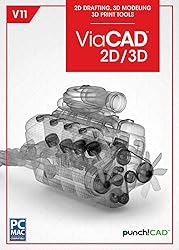
ViaCAD 2D/3D V11 [PC Download]
Detalles del producto
Disponibilidad
En stock
En stock
Peso con empaque
0.20 kg
0.20 kg
Devolución
No
No
Condición
Nuevo
Nuevo
Producto de
Amazon
Amazon
Viaja desde
USA
USA
Sobre este producto
- Precision 3D Design for Beginners, Experts, and Everyone In-betweenIntelligent, easy-to-use design tools coupled with an unbeatable price to performance ratio makes ViaCAD 2D/3D the ideal choice for CAD designers everywhere.UsabilityThe power of 3D design has never been easier. ViaCAD 2D/3D CAD software offers an amazing marriage of 2D and 3D design tools to turn your ideas into reality. Quickly toggle between 2D and 3D views and create files for popular 3D printers, 2D/3D architectural plans, mechanical plans, electrical schematics, furniture designs, and anything else you can dream up. ViaCAD 2D/3D will even automatically convert imported 3D models into 2D drawings and you can then quickly create detail, section, and auxiliary views - all while working in 2D.Creating 3D models is easy with ViaCAD, regardless of the design's complexity. The LogiCursor will guide your cursor to help you create drafting documents or even align points in 3D. Editing is as easy as drag and drops with the Gripper.The Gripper tool provides click and drag-style editing for moving, copying, scaling and rotating parts of the drawing even face. Push/Pull Modeling delivers intuitive editing of your 3D models, allowing 3D surfaces to be editing with your mouse and cursor. Customizable Grids can be configured as rectangular, polar (circular), and even Isometric.26,000 symbols are included to speed up your designing!Top FeaturesPowerful 3D tools such as mesh, surface, and solid modeling, blending, chamfering, and shelling3D printing verification toolsExtensive 2D drafting tools (text, dimensions, 3D to 2D drawing generation tools, bill of materials)LogiCursor allows drawing precisely with your mouse and cursor in both 2D and 3D. It thinks as you draw.Key Features of ViaCAD 2D and 3D V11!2D Geometric and Dimensional ConstraintsTool Icon SizingDuplicate Layer CommandSVG Import and ExportSimplify Curve Tool3MF Import & ExportVMRL 2.0 Texture SupportOBJ Texture SupportSketchUp 2018 Import/ExportDXF/DWG 2018 Import/Export2D Geometric and Dimensional ConstraintsDimension and constraint tools are now available to manage the geometric relationships between 2D shapes.Thirteen Geometric ConstraintsDimension ConstraintsVariable and EquationsAnimationAuto ConstrainAnimate Dimension and ConstraintsPowerful Solid ModelingViaCAD provides solid modeling technology found in many higher-end products. There is a unique tie between 2D and 3D; which means you can edit 2D profiles used to create 3D objects and the 3D shape will automatically update.Feature-based History Tree for editingPowerful 3D editing tools such as blending, chamfering, and shelling A complete design tool with extrusions, Booleans, surface modeling for more complex smooth surfacesPrecise geometry suitable for ‘concept to manufacturing' Tools to create 3D from 2D shapes 2D Drafting and DocumentationA complete set of 2D drawing tools is provided for drafting documents and sketching schematics, floor plans, mechanical designs and more.26 industry-standard dimension styles275+ tools for 2D drafting and editing Tools to create Section Views to highlight important drawing features Automatically generate 2D drawings from 3D modelsBill of Materials for trackingCompatibilityViaCAD is built with professional level technology providing speed, precision, and compatibility. Using ACIS-based geometry means you are creating with the same technology used by others using software costing thousands of dollars.Includes 19 file formats to share your designs.Compatible with AutoCAD 2019 DXF/DWGSketchUp 2018Includes STL export for 3D Printing3D Print ToolsViaCAD now includes 3D printing tools to prepare and validate designs to make them 3D printer ready. The printing tools will check for common errors that will save you time and money. Tools include:3D Print CheckSurface Normals CheckOverhang Analysis Wall ThicknessPreview Slices Auto PositionSupport StructureShow Printer VolumePrinter DefinitionsSome of the types of drawings you can tackle with ViaCAD 2D/3D:3D models for prototyping with 3D printersMechanical partsDIY projects: 3D models of furniture, house plans, etcArchitectural drawings for drafting documents, room layouts, and 3d visualizationInventions: Easily create 3D models of your conceptsEducational: Drawings and 3D models for science fairsObjects for use in-game development studiosWe Have Your BackWith our tutorials, free technical support, and active forum, you’ll always know a helping hand is close by. Minimum System Requirements:Operating System: Windows 10, Windows 8, Windows 7Processor: 64-bitMemory: 4GBStorage: 8GB available spaceAdditional Requirements: Windows: Recommended Requirements: Windows 7, Windows 8, and Windows 10¹, 64 Bit Intel Pentium or AMD Athlon class processor, 8 GB of hard disk space, 4 GB of RAM, An OpenGL/DirectX9 compliant video card with 256MB of dedicated RAM, Mouse Pointing Device (wheel button recommended), DVD-ROM Drive. Internet connection required².¹ Program compatibility is not guaranteed for later operating systems.²User is responsible for all Internet access fees and phone charges.

Producto prohibido
Este producto no está disponible
Este producto viaja
de USA ![]() a tus manos en
a tus manos en
![]()
 a tus manos en

Conoce más detalles
Perfect for creating 2D/3D architectural and, mechanical designs, electrical schematics, furniture designs, files for popular 3D printers, and any other 2D or 3D precision designs you can dream up. Extensive 2D drafting tools (text, dimensions, 3D to 2D drawing generation tools, bill of materials, etc.) Powerful 3D tools such as mesh, surface, and solid modeling, blending, chamfering, and shelling Push/Pull Modeling delivers intuitive editing of your 3D models, allowing 3D surfaces to be editing with your mouse and cursor 3D printing verification tools
Compra protegida
Disfruta de una experiencia de compra segura y confiable
![]() Garantía de entrega
Garantía de entrega
Con Tiendamia todas tus compras cuentan con Garantía de Entrega o devolución total de tu dinero.
Compras 100% seguras y garantizadas, para que pidas lo que sueñas y lo recibas del mundo a tu puerta.
Tarjetas de Débito y Crédito

Visa

Mastercard

American Express

Dinners

Discover

Alias
Pagos a través de PayPal
Compra procesada en dólares con dinero en cuenta o tarjetas internacionales.

PayPal

.svg)
 Garantía de entrega