


 Garantía de entrega






Artículo: AMZ-B07YDCRTSD
VXDIAG
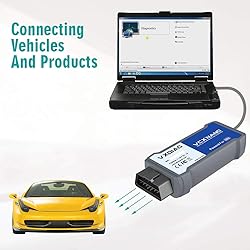
VXDIAG VCX Nano GDS2 and Tech2Win Diagnostic Tool Compatible for GM/OPEL with Global Diagnostic Programming System GDS & GDS2
Color:
Blue
Detalles del producto
Disponibilidad
En stock
En stock
Peso con empaque
0.26 kg
0.26 kg
Devolución
Sí
Sí
Condición
Nuevo
Nuevo
Producto de
Amazon
Amazon
Viaja desde
USA
USA
Sobre este producto
- VXDIAG
$360,18
44% OFF
$200,10
IMPORT EASILY
By purchasing this product you can deduct VAT with your RUT number
$360,18
44% OFF
$200,10
Envío gratis
 Llega en 5 a 12 días hábiles
Con envío
 Tienes garantia de entrega
Este producto viaja
de USA ![]() a tus manos en
a tus manos en
![]()
 a tus manos en

Conoce más detalles
[Technical assistance] If you have any installation problems about VXDIAG vcx Nano, Please be sure to download the installation manual before installation. Or please email us at any time. We can provide technical support and help you install software online. [Vehicle Coverage] Installation Tips: Please turn off anti-virus software before install. VXDIAG VCX NANO fully compatible with SAE-J2534-1 & SAE-J2534-2. All current and most legacy vehicle protocols: CAN, UART, KW2000, Class2, GM LAN, etc. [Functional] ●USB vehicle-to-PC connectivity●Supports Windows,XP●Supports Windows 7● CE and FCC compliance for hardware●Firmware Updatable. 【SPS】Service Programming System: ◎Passthrough programming on GM past model and Global A vehicles◎Increase reprogramming speed 20-70% and get ready to service new models. [GDS] Global Diagnostic System: ◎New Diagnostic Application Software required for all GM Global Architecture (Global A) Vehicles. ◎GDS & GDS2 is software which runs on a specific PC. Updates received via TIS2Web. [Efficient&Convenience] Quick access to vehicle data for maintenance or management reports.Quickly attaches to vehicle's diagnostic connector. Mixed fleet capabilities with broad protocol support.May be used with desktop PC or laptop. make sure your computer at least 4GB.Tech2win software only installed on 7 32bit computer and on physical system. Please download the latest vxmanager from vxdiag official website. [Update firmware and license] Use new vxmanager to update firmware and driver and then update your device authorization. GDS software need install on 64bit computer and use vmware machine. don't install vx nano on Windows 10 Home version, any Home version can not install successfully. Install vcx diag on the Pro Version.
Compra protegida
Disfruta de una experiencia de compra segura y confiable
![]() Garantía de entrega
Garantía de entrega
Con Tiendamia todas tus compras cuentan con Garantía de Entrega o devolución total de tu dinero.
Compras 100% seguras y garantizadas, para que pidas lo que sueñas y lo recibas del mundo a tu puerta.
Tarjetas de Débito y Crédito

Visa

Mastercard

American Express

Dinners

Discover

Alias
Pagos a través de PayPal
Compra procesada en dólares con dinero en cuenta o tarjetas internacionales.

PayPal

.svg)
