












Waveshare
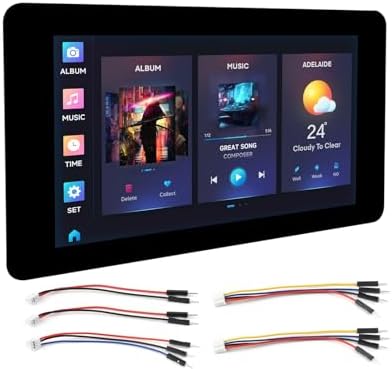
Waveshare ESP32-S3 7inch Capacitive Touch Screen Development Board 800×480 Resolution 7 inch 65K RGB LCD Disply,5-Point Touch,Supports WiFi & Bluetooth
Disponibilidad:
En stock
En stock
Peso con empaque:
0.46 kg
0.46 kg
Devolución:
Sí
Sí
Condición
Nuevo
Nuevo
Producto de:
Amazon
Amazon
Sobre este producto
- Onboard 7-inch capacitive touch screen, 800x480 resolution, 65K colors.
- Equipped with Xtensa 32-bit LX7 dual-core processor, up to 240MHz main frequency.
- Supports 2.4GHz Wi-Fi (802.11 b/g/n) and Bluetooth 5 (LE), with onboard antenna..Support capacitive touch control via I2C interface, 5-point touch with interrupt support.
- Built-in 512KB SRAM and 384KB ROM, with onboard 8MB Flash and 8MB PSRAM..Onboard CAN, RS485, I2C interface, Micro SD card slot and so on, integrates full-speed USB serial port.
- Support flexible clock, module power supply independent setting, and other controls to realize low power consumption in different scenarios.
AR$156,479
44% OFF
AR$86,932
IMPORT EASILY
By purchasing this product you can deduct VAT with your RUT number
AR$156,479
44% OFF
AR$86,932
Llega en 8 a 12 días hábiles
con envío
 Tienes garantía de entrega
Este producto viaja
de USA ![]() a tus manos en
a tus manos en
![]()
 a tus manos en


Compra protegida
Disfruta de una experiencia de compra segura y confiable
Tarjetas de Crédito y Débito

Visa

Mastercard

American Express
Pagos a través de PayPal
Compra procesada en dólares con dinero en cuenta o tarjetas internacionales.

Paypal
Pagos a través de MODO
Compra procesada en pesos desde la App de tu banco.

PayPal
Conoce más detalles
Overview ESP32-S3 7inch Capacitive Touch Display Development Board, ESP32 With Display, 800×480, 5-Point Touch, 32-Bit LX7 Dual-Core Processor, Up To 240MHz Frequency, Supports WiFi & Bluetooth, With Onboard Antenna Introduction The ESP32-S3-Touch-LCD-7 is a low-cost, high-performance microcontroller development board designed by Waveshare. It features 2.4GHz WiFi and BLE 5, integrates large Flash storage and PSRAM, and a 7-inch capacitive touch LCD screen. Support running GUI interface demos such as LVGL. It also has multiple external peripheral interfaces (such as CAN, I2C, RS485, and Sensor) for developing applications such HMI on ESP32-S3. With various functions and interfaces, it is suitable for power requirements in IoT, mobile devices, wearable electronics, and smart home applications. Package Content ESP32-S3-Touch-LCD-7 x1 HY2.0 2P to 2PIN male cable 10cm ×2 HY2.0 2P to 3PIN male cable 10cm ×1 HY2.0 2P to 4PIN male cable 10cm ×2 FAQ 1.ESP32-S3-Touch-LCD-7 CAN reception failure? ① Restart the COM port in UCANV2.0.exe and press the ESP32-S3-Touch-LCD-7 reset button multiple times. ② Uncheck DTR and RTS in the serial port debugging assistant. 2.ESP32-S3-Touch-LCD-7 shows no response after uploading an Arduino demo for RGB screen displaying? If there's no screen response after programming the code, check whether the correct configurations are set in Arduino IDE -> Tools: Choose the corresponding Flash (8MB) and enable PSRAM (8MB OPI). 3.ESP32-S3-Touch-LCD-7 fails to compile an Arduino demo for the RGB screen and shows errors? Check if the ESP32-S3-Touch-LCD-7_libraries is installed. Please refer to installation steps.

